10 Functions of RAM
Published: 16 Feb 2026
When you open an app or start a game, your device works hard behind the scenes to make everything run smoothly. One of the main helpers is RAM. It is the temporary memory that stores data for quick access. In this article, we will look at the 10 functions of RAM and discover why it is so important for everyday computing.
10 Functions of RAM
RAM stands for Random Access Memory. It is an important part of a computer that stores data temporarily. Many tasks cannot run efficiently without enough RAM. Here, we will explore the 10 functions of RAM for students.
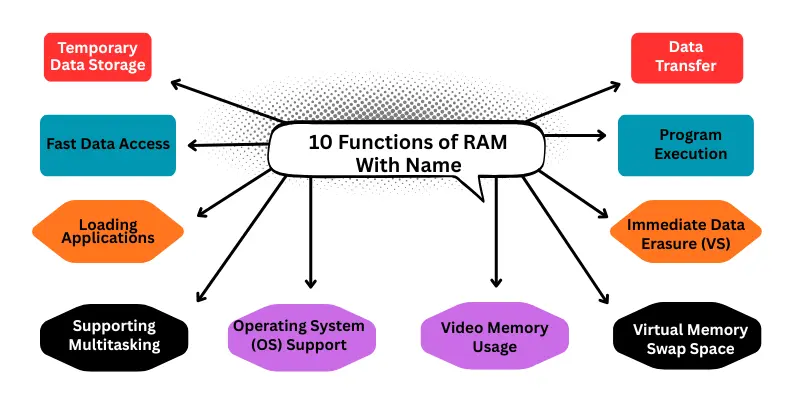
- Temporary Data Storage
- Fast Data Access
- Loading Applications
- Supporting Multitasking
- Operating System (OS) Support
- Video Memory Usage
- Virtual Memory Swap Space
- Immediate Data Erasure (Volatile Storage)
- Program Execution
- Data Transfer
1. Temporary Data Storage
RAM stores data temporarily while the computer is running. It keeps files and information that programs need right now. This helps the CPU access data quickly without waiting. It is like a workspace where current tasks are kept ready. For example, when a student opens a Word document, RAM holds it so they can type without waiting.
2. Fast Data Access
RAM allows the CPU to access data very quickly. Unlike storage drives, it works at high speed. This function helps programs respond instantly when opened or used. Faster access makes the computer feel smooth and fast. For example, opening a browser tab happens almost immediately because RAM retrieves data fast.
3. Loading Applications
When a user opens a program, RAM loads the necessary data so the software can start working immediately. Without RAM, opening apps would be very slow. This function makes launching apps faster and easier. For example, when you open a game like Minecraft, RAM stores the files so it can start fast.
4. Supporting Multitasking
RAM allows multiple programs to run at the same time without slowing down the system. It stores data for all active applications so users can switch between tasks smoothly. This helps when browsing, watching videos, and editing files together. For example, a student can listen to music, browse the web, and edit a document at the same time without the computer slowing down.
5. Operating System (OS) Support
The operating system uses RAM to perform basic tasks and manage hardware. RAM keeps system files ready so the OS can control the computer efficiently. Without enough RAM, the system may lag or freeze. For example, windows or macOS can open menus, run updates, and manage apps quickly because of RAM.
6. Video Memory Usage
RAM can store graphics data temporarily for games, videos, and images. This helps the computer display visuals faster and smoother. High RAM improves gaming experience and video playback. For example, while playing a video on YouTube or editing photos in Photoshop, RAM helps display images smoothly.
7. Virtual Memory Swap Space
When physical RAM is full, part of the storage drive can act as temporary memory called virtual memory. RAM works with virtual memory to prevent slowdowns. This ensures large programs or multiple tasks continue to run properly. For example, when editing a large video and RAM is full, the system uses storage as extra memory to avoid slowing down.
8. Immediate Data Erasure (Volatile Storage)
RAM is volatile, which means it loses all data when the computer is turned off. This ensures temporary files and active programs do not remain stored permanently. It keeps the memory clean and ready for new tasks. For example, when you turn off a laptop after finishing a project, all temporary files in RAM disappear automatically.
9. Program Execution
RAM stores program instructions while software is running. The CPU reads these instructions from RAM to execute tasks quickly. This function is essential for running applications without delays. For example, opening Microsoft Excel and calculating numbers quickly happens because RAM stores the program instructions.
10. Data Transfer
RAM acts as a bridge for transferring data between the CPU, storage, and other hardware. It ensures that information moves quickly and efficiently during processing. This helps in smooth computing and faster operations. For example, when copying a file from a USB drive to the computer, RAM helps transfer the data smoothly.
Conclusion
Alright friends, we have just gone through the 10 Functions of RAM and how they help your computer run better. From speeding up programs to supporting multitasking, RAM plays a big role in daily computing. Before thinking about a new purchase, check your system’s RAM sometimes a small upgrade can make a huge difference. If you found this article helpful, drop a comment and share your experience!
FAQs About Functions of RAM
Many people ask questions about the functions of RAM. Here are the complete details of these questions for students.
RAM stores the instructions and data of a program while it is running. The CPU reads these instructions from RAM to perform tasks quickly.
RAM temporarily stores system files that the operating system needs. This helps the OS manage hardware, run updates, and open menus smoothly.
Yes, more RAM allows the CPU to access data faster and reduces waiting time. This makes programs open quickly and run smoothly.
Volatile storage means RAM loses all stored data when the computer is turned off. It only keeps data temporarily while the device is on.
Yes, increasing RAM allows your computer to handle more programs and larger files at the same time. It reduces lag and improves speed.
The main functions of RAM include:
- Temporary Data Storage
- Fast Data Access
- Program Execution
- Supporting Multitasking
- Operating System Support
RAM stores data that the CPU needs immediately. This allows the system to fetch information without delay.
RAM acts as a temporary bridge to move data between the CPU, storage, and other hardware. This ensures smooth and fast data flow.
Buffering is storing data temporarily before it is processed or displayed. RAM holds this data to ensure smooth performance.