What Is a Joystick – Easy Computer Device Guide
Published: 1 Dec 2025
Imagine holding a stick in your hand that can move in any direction and instantly control a game, a robot, or even a flight simulator. That is exactly what is a joystick does. It is a versatile device that has become a favorite tool for gamers, engineers, and technology enthusiasts alike.
If you want to learn complete details about what is a joystick is, including joystick vs gamepad, FAQs, and full explanations, and if you need more information about computers, types of computer, parts, Touchpad, hardware, and software, then you can visit EC Science to get all the information.
What is a Joystick?
A joystick is a pointing device that is mainly used to control movements on a computer or gaming console. It is a stick that can move in different directions and sends signals to a computer, game, or other machines. Joysticks are common in gaming, flight simulators, and robotics. People also call it a joy stick, joytic, or simply a control stick. They are easy to use and make controlling devices fun and accurate.
History of Joystick
The idea of the joystick came from the need to control machines and vehicles more easily. It is believed that the first joystick was designed for aviation. Pilots needed a simple device to control airplanes precisely, and this idea inspired engineers to create a stick that could move in different directions.
The first joystick was invented by a French engineer named Robert Esnault-Pelterie in the early 1900s. It is recorded that he made the first functional prototype around 1908. This early joystick helped pilots control aircraft more smoothly than using levers or wheels.
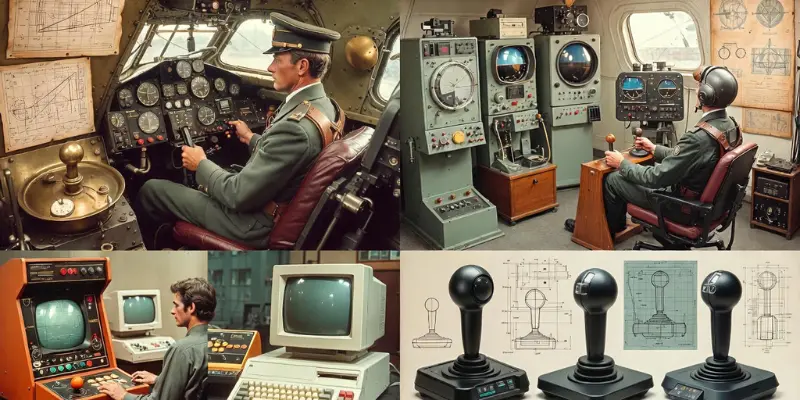
Over time, the joystick was adapted for computers and video games. In the 1960s, joystick models were updated for use in flight simulators. Then, in the 1970s and 1980s, gaming companies created joysticks for home computers and arcade games. They are now part of gaming consoles and PC setups.
The models of joysticks have improved with technology. Analog joysticks were introduced for gradual control, while digital joysticks gave fixed directional input. Later, hall effect joysticks added sensors for higher precision.
Among all these, some of the best joystick models include Logitech joysticks, Thrustmaster joysticks, and PlayStation joysticks. They are popular because of their accuracy, durability, and comfort. Other joysticks like retro and thumb joysticks are useful for specialized gaming or compact setups.
Here is a simple timeline of joystick development:
- 1908: First joystick invented by Robert Esnault-Pelterie for aviation.
- 1960s: Adapted for flight simulators.
- 1970s-1980s: Joysticks introduced for video games and home computers.
- 2000s onwards: Advanced models like analog, digital, and hall effect joysticks appear.
It is clear that the joystick has gone from a simple aviation tool to a versatile device for gaming, computers, and robotics. It has evolved with technology but the main idea remains the same: simple, precise control with a stick.
Types of Joystick
There are many types of joysticks, and they are designed for different purposes. It is important to know their differences so users can choose the right one. Here are 7 types of Joystick included:

- Analog Joysticks
- Digital Joysticks
- Flight Sticks
- Gamepad-Style Joysticks
- Paddle Joysticks
- Handgrip Joysticks
- Thumb Joystick
1. Analog Joysticks
Analog joysticks detect gradual movement in all directions. They are popular in gaming and computer applications where precision is needed. It is used in racing games, flight simulators, and other tasks where smooth control is important.
2. Digital Joysticks
Digital joysticks detect movement in fixed directions only. They are simple to use and mostly found in retro games and arcade machines. It is easier for basic control but does not allow fine movement.
3. Flight Sticks
Flight sticks are larger joysticks mainly used for controlling airplanes in simulators. They are equipped with extra buttons for throttle and other functions. It is popular among flight enthusiasts and professional pilots in training.
4. Gamepad-Style Joysticks
Gamepad-style joysticks are built into controllers. They are small sticks used for navigating games on consoles or PCs. It is convenient for handheld devices and casual gaming.
5. Paddle Joysticks
Paddle joysticks have a simple design and move left or right only. They are used in older games or specialized setups. It is easy to use and was popular in early gaming consoles.
6. Handgrip Joysticks
Handgrip joysticks are designed to fit comfortably in one hand. They are used for remote-controlled devices, robotics, and flight simulation. It is designed for better ergonomics and precision.
7. Thumb Joystick
Thumb joysticks are small sticks built into a game controller. They are convenient for handheld devices and laptops. It is ideal for quick movements in games or mobile setups.
It is clear that joysticks come in many forms. They are versatile, and each type has a special purpose. Knowing which type to choose makes gaming, simulation, or controlling devices much easier.
Parts of Joystick in Computer
A joystick in computer has several main parts that allow it to control games, simulations, and other devices. It is designed to make movements precise and easy. There are simple and complex components that work together to make the joystick functional.
Main Parts of a Joystick:
- Stick: The main handle you move in any direction.
- Base: Provides stability and houses sensors.
- Buttons: Extra controls for actions and commands.
- Sensors: Detect movement and position of the stick.
- Potentiometers: Measure angles in analog joysticks.
- Connectors: USB, Bluetooth, or wired connection to the computer.
- Thumb control: Small sticks for precise control on gamepads.
- Throttle: Extra lever for flight sticks or simulators.
- Grip: Ergonomic handle for comfortable use.
- Indicator LEDs: Show power or connection status in some models.
It is clear that all these parts work together so users can enjoy smooth and accurate control while using a joystick on a computer or gaming setup.
How a Joystick Works
A joystick is a simple device that it is used to control computers, games, robots, and other machines. It is easy to use because they are designed to convert your hand movements into signals that the computer or device can understand. There are several steps and parts involved in making a joystick work properly.
1. Moving the Stick
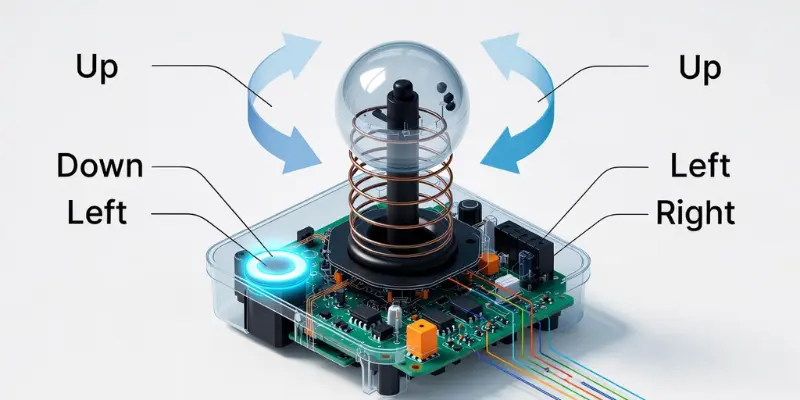
When you hold the joystick and push it in any direction, it is the main movement that starts the process. The stick can move forward, backward, left, right, or in diagonal directions depending on the joystick type.
2. Sensors Detect Movement
There are sensors inside the base of the joystick. In analog joysticks, potentiometers measure the angle and degree of movement. In digital joysticks, switches detect fixed directions. Hall effect joysticks use magnetic sensors to detect motion accurately. It is these sensors that tell the computer where and how far the joystick is moved.
3. Signal Transmission
After the movement is detected, the joystick sends signals to the computer, gaming console, or machine. They are converted into electronic signals that the software can read. It is like the joystick speaking to the computer in its own language.
4. Computer or Device Response
It is the computer or device that reacts to the signals. For example, in a game, if you move the joystick forward, your character moves forward. If you move it left, your vehicle turns left. They are interpreted instantly, giving smooth and accurate control.
5. Buttons and Extra Controls
Most joysticks have buttons, triggers, or extra levers. When you press a button, it is like sending another signal for actions like firing, jumping, accelerating, or using tools in the game. There are joysticks with extra controls for throttle, handgrip, or flight simulation.
6. Feedback and Force (Optional)
Some advanced joysticks, like FFB (Force Feedback) joysticks, give feedback when moving. It is done through small motors that push back, letting you feel vibrations or resistance. They are common in racing and flight simulators.
7. Wireless or Bluetooth Connection (Optional)
Modern joysticks can be wireless. They are connected via Bluetooth or USB without cables. It is convenient for computer setups or gaming where space is limited. The signals still go the same way to the device but without physical wires.
It is clear that a joystick works by detecting hand movements, converting them into signals, and then making the computer or device respond accurately. They are simple in design but very powerful for gaming, simulation, and controlling machines.
Applications of Joystick
Joysticks are used in many areas. It is a versatile device that makes controlling computers, machines, and games easier. There are several important applications where joysticks are commonly used.
1. Gaming
It is most commonly used in gaming. They are part of computers, consoles, and flight simulators. Joystick for video games helps players control characters, vehicles, or aircraft easily.
2. Computer Control
There are joysticks used to control software on computers. It is helpful in CAD programs, design applications, and simulation software where precise movement is needed.
3. Flight Simulators
It is a vital part of flight training. Flight sticks and advanced joysticks help pilots practice controlling airplanes safely. They are used in schools, training centers, and hobby simulators.
4. Robotics
It is used to control robots and remote-controlled machines. They are part of educational kits, industrial robots, and even robotic boats or cars.
5. Industrial Machines
It is used to operate cranes, forklifts, and other machinery. They are used where precise control is required.
6. Other Applications
There are joysticks in radio-controlled toys, drones, and assistive devices for people with disabilities. It is also used in DIY electronics and projects like Adafruit joystick modules.
It is clear that joysticks are versatile. They are used not only for fun in gaming but also in serious applications like training, robotics, and industrial machines.
Example IDs of Joystick
There are many joystick models available for gaming, computers, and other devices. It is useful to know some popular examples so users can choose the right one. They are designed with different features, sizes, and uses.
Popular Joystick Models:
- Logitech Joysticks: They are reliable, precise, and widely used for gaming and flight simulation.
- Thrustmaster Joysticks: It is popular among professional flight simulators and serious gamers.
- PlayStation Joysticks: They are built into controllers and convenient for console gaming.
- Kraft KC3 Joystick: It is an affordable option for PC gaming and beginners.
- USB Controller Joysticks: They are simple plug-and-play devices for computers or laptops.
- Analog Joystick Controllers: It is ideal for smooth movement and retro-style gaming.
- Hall Effect Joysticks: They are very accurate and durable, used in professional setups.
It is clear that each joystick model has its own strengths. They are suitable for different purposes, from casual gaming to professional flight simulation or robotics.
Joystick vs Gamepad
A joystick and a gamepad are both devices used for controlling games and computers. It is important to know the differences because they are used in different ways. There are advantages and disadvantages in each device that affect gaming experience.
| Feature | Joystick | Gamepad |
|---|---|---|
| Control Type | One main stick with movement in all directions | Multiple buttons and small thumb sticks |
| Precision | High, especially in flight simulators | Moderate, better for casual gaming |
| Best Use | Flight simulators, PC games, robotics | Console games, casual gaming, handheld devices |
| Movement | Analog or digital stick moves freely | Thumb sticks or buttons for directional input |
| Buttons | Fewer buttons, sometimes triggers | More buttons, triggers, and extra controls |
| Ergonomics | Larger handgrip or flight stick style | Fits in hand comfortably, easy to hold |
| Connection | USB, Bluetooth, wired, or wireless | Wired or wireless, mostly Bluetooth for consoles |
| Models | Logitech Joysticks, Thrustmaster Joysticks | PlayStation joysticks, gamepad with joystick |
| Special Uses | Flight simulation, robotics, industrial control | Video games, casual PC gaming, handheld consoles |
| Feedback | Can include force feedback (FFB) | Usually vibration motors for feedback |
Advantages and Disadvantages of Joystick
A joystick is a helpful control device used in computers, games, and machines. It is easy to use and gives smooth movement in many directions. There are strong points and weak points that every user should know before choosing a joystick.
| Advantages of Joystick |
|---|
|
| Disadvantages of Joystick |
|---|
|
Conclusion
A joystick is an important input device that makes controlling computers, games, and machines simple and fun. They are available in many types like analog joystick PC, digital, and hall effect joysticks. Whether for gaming, simulation, or robotics, joysticks provide precise movement and enhance user experience.
FAQs about Joystick
There are many types of joysticks used today. These include analog joysticks, digital joysticks, flight sticks, paddle joysticks, handgrip joysticks, and gamepad-style joysticks. Each type has its own style and control method. Some are simple, and some are made for advanced gaming and machines.
A joystick gives smooth movement in video games. It is used to move characters, control cars, fly planes, shoot targets, and explore game worlds. Many gamers prefer joysticks because they are easy to hold and give better control than a keyboard.
Yes, they are made to work with many systems. A joystick connects to PCs and consoles through USB cables or wireless signals. It is also supported by PlayStation, Xbox, and some Nintendo devices.
No, not every game supports joysticks. Some games only support keyboards or gamepads. Racing games, flight games, arcade games, and simulator games support joysticks the most.
Yes, many joysticks have custom buttons and settings. A user can change button functions, adjust sensitivity, or create their own control layout. This helps them play games in the way they like.
Yes, there are wireless joysticks that use Bluetooth or a USB receiver. Wireless models remove cable mess and give more free movement. They are easy to carry and use anywhere.
Yes, some joysticks work with mobiles. They connect through Bluetooth or OTG cable. Many mobile games support joystick movement, which makes gameplay smoother.
The price depends on the model. Simple joysticks cost very little. Flight joysticks and advanced controllers cost more because they have buttons, sensors, and special features.
Yes, many joysticks are built for easy use. They help people with movement difficulties control machines, wheelchairs, and computers. These special joysticks offer larger grips and soft controls.
Yes, some VR systems support joysticks. They help users control planes, cars, and tools inside VR games. A joystick gives more accuracy than VR hand controllers in simulation games.
A joystick gives smooth movement, good hand comfort, and better accuracy. It is very helpful in racing, flying, and arcade games. It is also easy to use for beginners.
Yes, it works with training software, design tools, and robotics programs. It gives fine control where a mouse cannot work well.
Yes, a joystick is the best tool for flight simulators. It helps users feel real plane control. Many flight sticks even include throttle levers and special buttons for flying.
Yes, some joysticks work with Nintendo Switch and retro consoles. Support depends on the model. Some need adapters to work on old devices.
Yes, many joystick apps allow users to set buttons for play, pause, volume, and skip. It makes media control hands-free and quick.
Yes, many systems support more than one joystick. This helps in multiplayer gaming or special control setups like flight simulators with two joysticks.