What is LCD Monitors – Benefits – Types and Uses for Users?
Published: 18 Jan 2026
Many users feel confused when choosing a computer monitor. Terms like LCD, LED, and display panel can feel unclear. LCD monitors solve many problems by offering thin design, low power use, and clear visuals. That is why understanding what is LCD monitors are helps users make better choices.
What Is LCD Monitors?
LCD stands for Liquid Crystal Display. LCD monitors are types of monitor. LCD monitors are flat computer screens that use liquid crystal display technology to show images, text, and videos. It is a common display device used in LCD PC monitors, laptops, TVs, and phones. LCD means Liquid Crystal Display, and in computer terms, it refers to a screen that controls light using liquid crystals placed between glass layers.
History of LCD Monitors
LCD monitor history started in the 1960s. During this time, George H. Heilmeier played an important role. He discovered how liquid crystals could be used to create images. Because of his work, he is known as the father of LCD technology. His idea came from the need for displays that use less power and take less space than old screens.
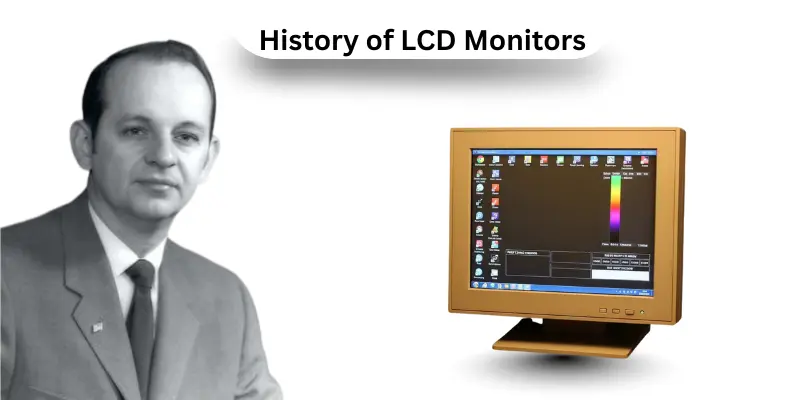
- In the 1960s, George H. Heilmeier created the first LCD screen. It was small and very basic. It used liquid crystals to control light and form simple images. This invention proved that liquid crystal display technology could work.
- In the 1970s, scientists focused on improving LCD technology. They worked to make LCD screens brighter and clearer. Many changes were made to improve image quality and visibility. These improvements helped LCD displays become more useful.
- In the 1980s, Sharp Corporation introduced the first commercial LCD monitor. This was the first LCD monitor available for everyday use. People could now use LCD screens in real devices, not just experiments.
- In the 1990s, LCD monitors became more popular. They started appearing in computers and televisions. Screen quality improved a lot during this time. Displays became sharper, brighter, and more reliable.
- By the early 2000s, LCD monitors were everywhere. They replaced old CRT monitors because LCD screens were thinner, lighter, and energy-efficient. They also saved desk space and used less electricity.
Today, LCD monitors are still widely used. They appear in smartphones, tablets, laptops, TVs, and computer monitors. Modern LCD monitors now use LED backlit LCD technology, which offers better brightness and lower power use. LCD technology continues to improve and remains an important part of modern displays.
Parts of LCD Monitors
An LCD monitor is made of several key parts that work together to display clear images and colors. Each part has a specific role, and without any one of them, the screen would not function properly. Here are 12 parts of LCD monitors included.
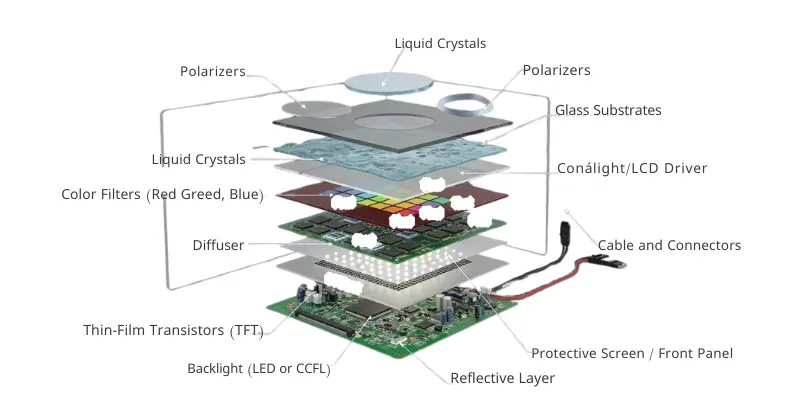
12 Parts of LCD Monitors:
- Liquid Crystals
- Backlight (LED or CCFL)
- Polarizers
- Color Filters (Red, Green, Blue)
- Glass Substrates
- Thin-Film Transistors (TFT)
- Pixels
- Control Circuit / LCD Driver
- Diffuser
- Reflective Layer (in some monitors)
- Protective Screen / Front Panel
- Cables and Connectors
How LCD Monitor Works
An LCD monitor works by using multiple layers and components to display clear images and videos. Each part has a specific role in controlling light and creating visuals. Here is a detailed explanation of the key components and how they work together.
1. Liquid Crystals
Liquid crystals are the main part of the LCD panel. They do not emit light by themselves but can twist and block light when an electric current passes through them. This movement allows the monitor to show different images on the LCD screen.
2. Backlight
The backlight provides the light needed for the screen. Most LCD monitors today use an LED backlit LCD display, which is bright, energy-efficient, and long-lasting. Without the backlight, the LCD monitor would appear dark.
3. Polarizers
Polarizers are thin layers that filter light. They help control the direction of light passing through the liquid crystal layer. This is essential for making images visible on the LCD screen.
4. Color Filters
Each pixel on an LCD computer monitor has a red, green, and blue color filter. These filters mix light to create full-color images. This is how LCD monitors display vibrant pictures and videos.
5. Electric Current
Electric current flows through the thin-film transistors (TFT). This current controls the twisting of liquid crystals, allowing light to pass in different ways. The current is managed by the control circuit / LCD driver.
6. Glass Substrates
Glass layers, called substrates, hold the liquid crystals in place. They keep the layers stable and protect the screen from damage.
7. Thin-Film Transistors (TFT)
TFTs are tiny switches behind each pixel. They turn pixels on or off and control the electric current for accurate image display.
8. Pixels
Pixels are the smallest units on the LCD monitor. They are made of liquid crystals and color filters. Each pixel changes light to show part of an image. Many pixels together make a full display.
9. Control Circuit / LCD Driver
The LCD driver sends signals to the TFTs and controls how each pixel behaves. This circuit ensures that the monitor shows the correct images sent by the computer.
10. Diffuser
The diffuser spreads the light evenly across the LCD screen. Without it, some areas would appear brighter or darker than others.
11. Reflective Layer
Some LCD monitors use a reflective layer to bounce light back through the crystals. This helps improve brightness and visibility, especially in reflective LCD computer monitors.
12. Protective Screen
The outer screen protects the LCD monitor from scratches, dust, and damage. It also keeps all the internal layers in place.
13. Cables and Connectors:
Finally, cables and connectors link the LCD monitor to a computer or TV. They transmit video signals that the control circuit uses to turn pixels on and off.
Types of LCD Monitors
LCD monitors come in different types, and each type is designed for specific uses. They use liquid crystal display (LCD) technology, but their design and features can vary. Explain the types of LCD monitors, which helps users choose the right screen for computers, laptops, TVs, or other devices.
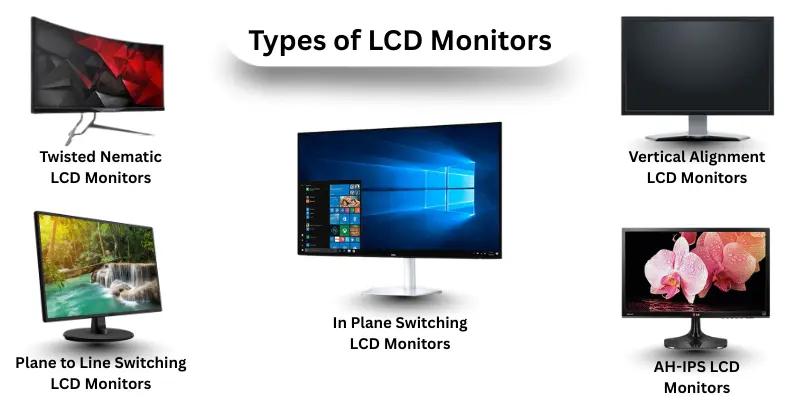
Here are the main types of LCD monitors:
- Twisted Nematic LCD Monitors
- In Plane Switching LCD Monitors
- Vertical Alignment LCD Monitors
- Plane to Line Switching LCD Monitors
- Advanced High Performance In Plane Switching (AH-IPS) LCD Monitors
1. Twisted Nematic (TN) LCD Monitors
TN monitors are fast and affordable. They are popular for gaming and basic office work. They have shorter response times but limited viewing angles.
5 Examples of Twisted Nematic LCD Monitor:
- Dell TN Monitor,
- Asus TN Gaming Monitor,
- Acer TN Display,
- HP TN Monitor,
- Lenovo TN Monitor
2. In Plane Switching (IPS) LCD Monitors
IPS monitors offer better color accuracy and wider viewing angles. They are ideal for designers, photographers, and professionals.
5 Examples of In Plane Switching LCD Monitor:
- LG IPS Monitor
- Dell UltraSharp IPS
- Asus ProArt IPS
- BenQ IPS Display
- Acer IPS Monitor
3. Vertical Alignment (VA) LCD Monitors
VA monitors provide deep blacks and good contrast. They are suitable for movies and multimedia. Here are examples of vertical alignment LCD monitors included.
5 Examples of Vertical Alignment LCD Monitor:
- Samsung VA Monitor
- LG VA Screen
- AOC VA Display
- ViewSonic VA Monitor
- Philips VA Screen
4. Plane to Line Switching (PLS) LCD Monitors
PLS monitors are similar to IPS but slightly brighter and cheaper. They are good for everyday work and entertainment. Here are examples of plane to line switching LCD monitor included.
5 Examples of Plane to Line Switching LCD Monitor:
- Samsung PLS Monitor
- LG PLS Display
- Acer PLS Screen
- Asus PLS Panel
- BenQ PLS Monitor
5. Advanced High-Performance In-Plane Switching (AH-IPS) LCD Monitors
AH-IPS monitors are an advanced version of IPS. They give higher resolution, accurate colors, and wide viewing angles.
5 Examples of Advanced High Performance In Plane Switching LCD Monitor:
- Dell UltraSharp AH-IPS
- LG 4K AH-IPS
- Asus AH-IPS Monitor
- BenQ AH-IPS Display
- Acer AH-IPS Monitor
Uses of LCD Monitors
LCD monitors are used in millions of homes, offices, and schools around the world. They provide clear images, vibrant colors, and energy-efficient displays. From computers to TVs, cameras to industrial equipment, LCD monitors have become an essential part of daily life and modern technology.
Here are 10 uses of LCD Monitors included:
- Gaming: High-speed LCD PC monitors are popular among gamers for fast response times.
- Medical Equipment: Some medical LCD displays are used in hospitals for imaging and monitoring.
- Office Work: LCD monitors in computers are used for spreadsheets, documents, and presentations.
- Security Systems: CCTV and surveillance cameras use LCD screens to monitor video feeds.
- Digital Signage: Shops and public places use LCD panels for advertisements and information boards.
- Cameras and Photography: LCD screens on cameras help preview and check pictures instantly.
- Entertainment: LCD monitors are used in gaming consoles, home theaters, and movie screening systems for sharp and colorful displays.
- House Uses: Many homes use LCD screens for smart home devices, kitchen appliances, and personal laptops.
- Industrial Applications: Factories and industrial settings use LCD panels for controlling machines, monitoring processes, and digital dashboards.
- Education: Schools and colleges use LCD monitors in computers and LCD projectors for teaching, presentations, and online learning.
LCD Monitor vs CRT Monitor
LCD monitors and CRT monitors are two types of display screens used in computers and TVs. While LCD monitors are slim, energy-efficient, and provide clear images, CRT monitors are bulky, heavy, and consume more power but offer deeper colors and better contrast in some cases. Comparing LCD vs CRT monitors helps users understand which display is suitable for their needs.
| Feature | LCD Monitor | CRT Monitor |
|---|---|---|
| Design & Size | Slim, lightweight, and easy to move | Bulky and heavy, takes more desk space |
| Energy Consumption | Low power usage, energy-efficient | High power consumption |
| Image Quality | Clear, sharp images; good for text and videos | Good color depth and contrast but can be blurry |
| Screen Flicker | No noticeable flicker | May flicker, causing eye strain |
| Viewing Angles | Limited in some models; modern IPS panels better | Wide viewing angles |
| Response Time | Fast in modern models; suitable for gaming | Slightly slower response in older CRTs |
| Durability | Fragile, screen can crack easily | Very durable, resistant to physical damage |
| Space Requirement | Takes less space; fits small desks | Requires a large desk; heavy setup |
| Applications | Computers, TVs, laptops, industrial panels | Older desktops, retro gaming, specific professional uses |
| Cost | Moderate to high for advanced models | Generally cheaper for older models |
Advantages and Disadvantages or LCD Monitors
LCD monitors use liquid crystal display technology to produce bright and sharp images. They are widely preferred over older monitors because they save space and electricity. However, like all technology, there are both pros and cons to consider when using LCD monitors.
| Advantages of LCD Monitors |
|---|
|
| Disadvantages of LCD Monitors |
|---|
|
Conclusion
LCD monitors have become a key part of modern technology. They use liquid crystal display (LCD) technology to provide bright, sharp, and energy efficient screens. From computers and laptops to TVs and industrial panels, LCD monitors are lightweight, space-saving, and easy to use. While they have some limitations like fragile screens and limited viewing angles, their advantages in clarity, energy efficiency, and versatility make them the preferred choice over older monitors like CRTs. Overall, LCD monitors are reliable, user-friendly, and essential for work, entertainment, and education in today’s world.
FAQs: What is LCD Monitors
LCD monitors work by passing electric current through liquid crystals sandwiched between glass substrates. A backlight shines through the crystals, and polarizers and color filters create clear images on the screen.
The main parts include liquid crystals, backlight, polarizers, color filters, glass substrates, thin-film transistors (TFT), pixels, control circuits, diffuser, reflective layer, protective screen, and cables and connectors.
Advantages include slim design, energy efficiency, clear and sharp images, no flicker, and variety of sizes for computers, TVs, and laptops.
Disadvantages include limited viewing angles, fragile screens, backlight issues, and higher cost for advanced models.
Unlike CRT monitors, LCD monitors are slim, lightweight, and energy-efficient, while CRTs are bulky, heavy, and consume more electricity.
They are used in computers, laptops, TVs, industrial panels, education, and entertainment setups at home or offices.
Yes, modern LCD monitors with fast response times and LED backlighting are suitable for gaming, offering smooth visuals and bright colors.
Types include TFT-LCD, IPS-LCD, TN-LCD, VA-LCD, and LED-backlit LCD monitors, each offering different performance and viewing quality.