Difference Between Http and Https – Easy Guide for Beginners
Published: 29 Jan 2026
People feel unsafe when they type private details on a website. This happens more on sites that use HTTP. That is why the Difference Between HTTP and HTTPS matters a lot. HTTPS gives a safe way to send data. It locks information so it cannot be read by strangers. For anyone who cares about privacy, knowing this difference can stop data from getting stolen. This article explains complete details about HTTP and HTTPS for beginners.
What Is HTTP?
HTTP stands for HyperText Transfer Protocol. It is the rule set that tells web browsers and servers how to talk to each other. When a person opens a web page, the browser uses HTTP to ask the server for that page. Then the server sends the page back to the browser. HTTP moves text, images, and videos over the internet so people can see web pages.
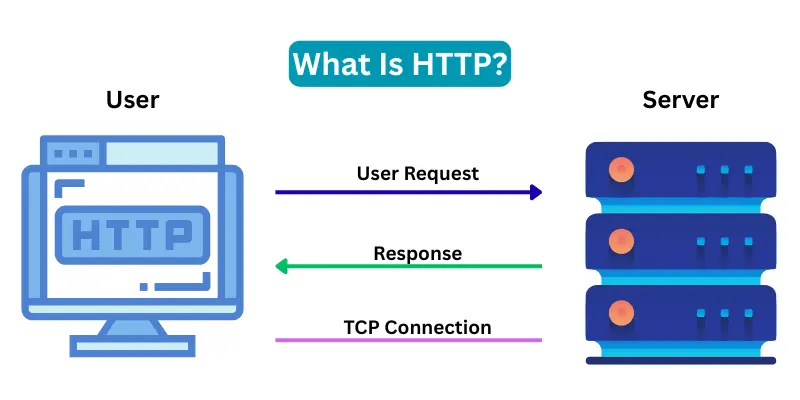
HTTP sends data in plain text. This means anyone on the same network can read that data easily. It does not lock or protect the data. For this reason, HTTP is not safe for private details like passwords or credit card numbers.
HTTP uses a default number called port 80 to send and receive information. It works at a basic level of the internet rules. Because it has no security lock, many modern websites now use a safer version called HTTPS.
Key Features of HTTP
Key Features of HTTP describe the basic way web pages move online. HTTP works as a simple rule system. Browsers send requests, and servers send responses. This process helps users open pages, read text, and view images on the internet. No safety lock protects the data during transfer. Here are some key features of HTTPS for beginners.
- Sends and receives web page data.
- Uses plain text for all information.
- Does not protect or lock user data.
- Works on port 80 by default.
- Browser and server talk in simple steps.
- Does not use certificates for safety.
- Loads regular web pages fast but not secure.
- Shows no lock icon in the browser address bar.
Characteristics of HTTP
HTTP is the standard way websites send information over the internet. It handles requests and delivers pages quickly. Its main characteristics include speed, openness, and compatibility with all browsers. These features make HTTP simple but less secure for private data.
- Rule for Web Communication: HTTP tells web browsers and servers how to talk and share pages.
- Plain Text Transfer: Data goes in simple form, not locked or hidden.
- No Built in Security: Data stays open while moving between browser and server.
- Stateless Protocol: Every request stands alone. Each page request has no memory of the last one.
- Port Number 80: HTTP normally uses number 80 to send and receive web data.
- Fast Data Movement: Without security locks, HTTP sends information quickly.
- Works With URLs: Web links start with http:// to show use of this rule.
- Common for Public Pages: Basic info pages use HTTP where privacy is not needed.
- Easy to Use: No setup for security certificates or locks.
- Compatible With All Browsers: Every web browser understands HTTP rules.
How Does HTTP Protocol Work?
HTTP protocol works like a messenger between a user’s browser and a web server. When a user opens a web address starting with http://, the browser sends a request message. This request asks the server for a specific page or file. Then, the server reads the request and sends a response message. The response contains the web page or file the browser asked for.
Explain work about http in details.
1. Browser Sends Request
When a user opens a website, the browser sends a request to the web server. The request asks the server for a specific web page or file. This request includes the type of action, like GET (to get data) or POST (to send data).
2. Server Receives Request
The server receives the browser’s request and checks what is being asked. If the requested page or file exists, the server prepares a response. If it does not exist, the server may send an error message like 404 Not Found.
3. Server Sends Response
The server sends the requested page or file back to the browser. This response is sent as plain text without encryption. It contains the web page content, images, videos, or other files.
4. Browser Displays Content
The browser reads the server’s response and displays the web page to the user. The page appears exactly as the server sent it. HTTP does not keep a secure connection, so the data is visible to anyone on the network.
5. Open Data Transfer
All data sent via HTTP is plain text. This means anyone with access to the network can see the information. This makes HTTP fast and simple, but not safe for personal information like passwords, messages, or payments.
6. Stateless Protocol
HTTP does not remember previous requests. Each request is independent and does not store information about past actions. This is called a stateless protocol.
7. Default Port
HTTP uses port 80 for communication between the browser and server. This is the standard port for sending and receiving web data.
8. Limitations of HTTP
Since HTTP does not encrypt data, it is not suitable for websites that share private information. Hackers can intercept or tamper with the data easily.
Advantages and Disadvantages of HTTP
HTTP is the most common way websites send and receive data. It moves information quickly from servers to browsers. HTTP is simple and works on almost all websites. But it does not protect private information. Knowing its advantages and disadvantages helps users understand when it is safe to use.
| 10 Advantages of HTTP |
|---|
|
| 10 Disadvantages of HTTP |
|---|
|
What Is HTTPS?
HTTPS stands for HyperText Transfer Protocol Secure. It is a rule that helps browsers and servers talk to each other in a safe way. HTTPS works just like HTTP, but it adds a security layer on top. This security keeps data safe from hackers while it travels over the internet.
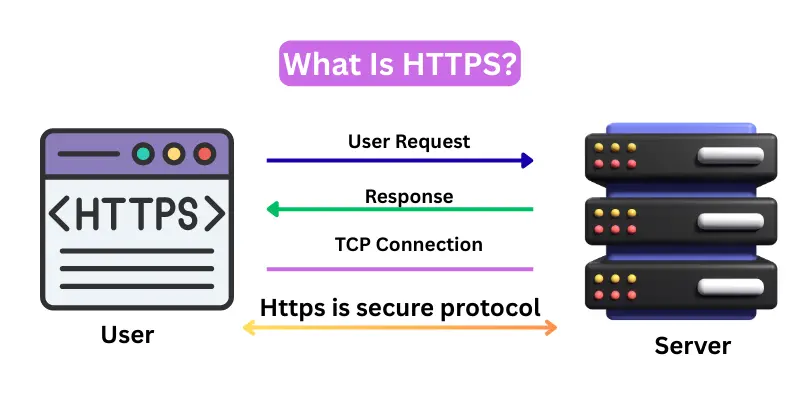
When a user opens a web page that uses HTTPS, the browser and server create a secure connection before they share data. This security comes from a SSL/TLS certificate. The certificate locks the data so no one else can read it. Because of this lock, HTTPS protects passwords, messages, and other private details.
Web addresses with HTTPS start with “https://” and show a padlock icon in the browser bar. Users can easily see that the site is safe. Search engines also prefer HTTPS and may rank those sites higher. Today, most modern websites use HTTPS to protect visitor data and gain trust.
Key Features of HTTPS
HTTPS is the secure version of HTTP. It encrypts data between the browser and server. Websites using HTTPS show a padlock icon in the address bar. These key features keep passwords, messages, and personal details safe from hackers.
- HTTPS encrypts data between the browser and server to keep it safe.
- It uses SSL/TLS certificates to create a secure connection.
- The padlock icon in the browser shows that the website is safe.
- Web addresses start with https:// to indicate a secure site.
- HTTPS protects personal information such as passwords, messages, and payments.
- It prevents eavesdropping so others cannot read the data.
- It prevents data tampering so hackers cannot change the information.
- HTTPS supports modern web standards and works with all browsers and devices.
- It improves user trust as visitors feel safe on the website.
- HTTPS helps websites rank better on Google by being SEO friendly.
Characteristics of HTTPS
HTTPS is the secure version of HTTP. It encrypts data between browsers and servers to keep it safe. Its key characteristics include SSL certificates, a padlock icon, and web addresses starting with https://. These features make websites trustworthy and secure for users.
- Secure Data Transfer: Encrypts all information between browser and server.
- SSL/TLS Certificates: Uses certificates to create a trusted and secure connection.
- Padlock Icon: Shows users the website is safe and trustworthy.
- HTTPS in URL: Web addresses start with https:// indicating security.
- Data Privacy: Protects passwords, messages, and payment information.
- Prevents Eavesdropping: Others cannot read data while it travels.
- Prevents Data Tampering: Data cannot be changed by hackers during transfer.
- Supports Modern Web Standards: Works with all modern browsers and devices.
- Improves User Trust: Visitors feel confident browsing the website.
How Does HTTPS Protocol Work?
HTTPS is the secure version of HTTP. It encrypts data between the browser and server to protect personal information. The protocol uses SSL/TLS certificates, session keys, and encryption to keep data safe during transfer. This makes browsing, shopping, and online communication much safer.
Explain work about http in details.
1. Browser Sends Connection Request
When a user opens a secure website, the browser immediately sends a request to the web server. This request is the first step in creating a secure connection. The browser asks the server, “Can we connect safely?” This is done before any private data like passwords or payment information is sent.
2. Server Sends SSL/TLS Certificate
The server responds by sending its SSL/TLS certificate to the browser. This certificate is like an identity card for the website. It contains the server’s public key and proves that the website is legitimate. The certificate also includes information about who issued it and how long it is valid.
3. Browser Checks the Certificate
The browser carefully checks the certificate to make sure it is real and trustworthy. It verifies the issuer, the expiration date, and whether the certificate matches the website’s address. If the certificate is valid, the browser proceeds. If not, the browser shows a warning to the user, indicating the site might be unsafe.
4. Secure Session Key Creation
Once the certificate is approved, the browser and server create a secure session key. This key is a secret code used to lock (encrypt) all the data that will travel between them. Both the browser and server agree on this key so that only they can read the information. This process is called the TLS handshake.
5. Browser Sends Encrypted Request
Using the session key, the browser sends its request for web pages or files. Because the request is encrypted, no one on the network can read it or steal information. Even if someone intercepts the data, it will appear as unreadable code.
6. Server Sends Encrypted Data
The server receives the encrypted request and prepares the response. All web page content, images, videos, or files are encrypted using the session key. The server then sends this data back to the browser over the secure connection.
7. Browser Decrypts and Displays Data
The browser uses the same session key to decrypt the data and show the web page correctly to the user. This ensures that the content is displayed exactly as the server sent it, without anyone tampering with it.
8. Indicators of Security
When HTTPS is active, the browser shows a padlock icon in the address bar. The URL also starts with https:// instead of http://. These indicators let users know that the connection is secure and private.
9. Protection Provided by HTTPS
HTTPS protects users in three main ways:
- Data Privacy: All information, like passwords, messages, or payment details, is encrypted.
- Data Integrity: The data cannot be changed or tampered with by anyone during transfer.
- Authentication: The SSL/TLS certificate ensures that the website is genuine and not fake.
10. Importance of HTTPS
HTTPS is essential for websites that deal with private or sensitive information, such as online shopping, banking, login pages, and forms. Without HTTPS, data can be easily intercepted or modified. Using HTTPS builds trust with users and improves search engine rankings because Google prefers secure websites.
Advantages and Disadvantages of HTTPS
Have you ever wondered why some websites show a padlock while others do not? The answer is HTTPS. It secures data, prevents tampering, and verifies website identity. Understanding its advantages and disadvantages helps users stay safe online.
| 10 Advantages of HTTPS |
|---|
|
| 10 Disadvantages of HTTPS |
|---|
|
HTTP vs HTTPS
HTTP and HTTPS are protocols used for transferring data on the web. HTTP is simple and fast but does not encrypt data. HTTPS is the secure version, encrypting data, verifying websites, and protecting users from hackers. Here are the differences between HTTP and HTTPS, easy to learn for beginners.
Difference Between HTTP and HTTPS
| Feature | HTTP | HTTPS |
|---|---|---|
| Full Form | Hypertext Transfer Protocol | Hypertext Transfer Protocol Secure |
| Security | Not secure | Secure (encrypts data with SSL/TLS) |
| Data Encryption | No encryption | Data is encrypted to prevent theft |
| Certificate | No certificate needed | Requires SSL/TLS certificate |
| Port | 80 | 443 |
| User Trust | Low, no padlock icon | High, padlock icon shows site is secure |
| Performance | Faster, less resource use | Slightly slower due to encryption |
| Data Integrity | Data can be tampered | Data cannot be changed or tampered with |
| Best For | Public websites, blogs | Online banking, shopping, login pages |
| SEO | Does not boost ranking | Helps improve search engine ranking |
Why Choose HTTPS Over HTTP?
Many websites still use HTTP because it is simple and fast. However, HTTPS offers better security, privacy, and trust. Choosing HTTPS over HTTP ensures that all data between the browser and server is encrypted. It protects personal information, prevents tampering, and helps websites rank higher on search engines.
1. Data Encryption and Privacy
HTTPS encrypts all data exchanged between the user’s browser and the server. This means passwords, messages, and payment information are kept private. Unlike HTTP, which sends data in plain text, HTTPS ensures no one can read or steal information while it travels across the internet.
2. Website Authentication
HTTPS uses SSL/TLS certificates to verify the identity of the website. This ensures that users are connecting to the genuine website and not a fake or malicious one. HTTP has no verification, which makes users vulnerable to phishing attacks.
3. Data Integrity
With HTTPS, data cannot be altered or tampered with during transfer. Any attempt to change the data will break the secure connection and alert the browser. HTTP does not provide this protection, so hackers can intercept and modify data easily.
4. User Trust and Confidence
Websites using HTTPS show a padlock icon and “https://” in the URL. This builds trust with visitors, encouraging them to enter personal information or make online purchases. HTTP websites do not have this visual indicator, which may make users hesitant to share sensitive data.
5. SEO Benefits
Search engines like Google prefer HTTPS websites over HTTP. Using HTTPS can improve search engine rankings, attract more visitors, and enhance the credibility of the website. HTTP websites may rank lower due to the lack of security features.
7. Protection Against Cyber Attacks
HTTPS protects against eavesdropping, man in the middle attacks, and data breaches. Users of HTTP websites are more vulnerable to hackers who can intercept or steal unencrypted data. HTTPS is essential for any website that handles sensitive information.
Conclusion
HTTP is fast and simple but does not encrypt data, making it less secure for sensitive information. HTTPS encrypts all data, verifies websites, and protects users from hackers and tampering. It builds trust with visitors, improves search engine rankings, and ensures safe browsing. Websites handling passwords, payments, or personal data should always use HTTPS. In short, HTTPS is the better choice for security, privacy, and user confidence.
FAQs About HTTP vs HTTPS
Many people ask questions about HTTP and HTTPS. Here are complete FAQs about HTTP and HTTPS, easy to learn for beginners.
HTTPS requires an SSL/TLS certificate, which may cost money depending on the provider. Free certificates are available, but paid certificates offer higher trust. HTTP does not require any certificate, so it is cheaper but not secure.
AWS provides services like AWS Certificate Manager (ACM) to issue and manage SSL/TLS certificates. It helps integrate HTTPS with websites, load balancers, and CloudFront distributions easily. This ensures secure data transfer without complex setup.
HTTPS protects sensitive customer data like passwords, messages, and payments. It builds trust, improves search engine rankings, and prevents hackers from intercepting or tampering with data. Businesses using HTTPS show reliability to users.
Yes. Migrating to HTTPS is important for security, user trust, and SEO. It encrypts data, prevents hacking, and ensures safe communication. Even basic websites benefit from HTTPS for credibility.
HTTP is simple and fast but does not encrypt data. HTTPS is secure, encrypts information, and verifies website identity using SSL/TLS certificates. HTTPS is recommended for websites handling private data.
HTTPS may slightly increase loading time due to encryption, but modern servers and browsers handle it efficiently. The security and trust benefits far outweigh the small performance difference.
Users can check the browser’s address bar. Websites using HTTPS show a padlock icon and “https://” in the URL. This indicates a secure connection.
HTTPS protects data in transit but does not prevent all attacks. Other security measures, like strong passwords and firewalls, are also necessary. HTTPS ensures safe communication between browser and server.
Yes. Google and other search engines prefer HTTPS websites. Using HTTPS can improve rankings and attract more visitors. HTTP websites may rank lower because they are not secure.
Yes. HTTPS can be implemented on blogs, e-commerce sites, banking sites, or any web application. It ensures secure data transfer and builds user trust across all types of websites.