Output Devices of Computer – Monitor | Printer & More
Published: 16 Nov 2025
Many users ask why the output devices of computers matter so much. People see screens, hear sound, or print pages, but they still wonder how these devices share the final result. These tools help the computer show data in a way that feels easy and simple for everyone.
If you want to learn complete details about output devices of computer, like monitors, types of printers and more, you can visit EC Science and read about each output in detail.
What Are Output Devices?
Output devices of computer send final data from a computer to users in a clear form. A screen shows pictures, a printer creates paper copies, and speakers play sound. Each device presents results in a way that feels simple for students and beginners. These tools help with study, work, music, videos, and design. A computer processes information inside, and the device shows the finished result in a visual or audio form that anyone can follow with ease.
Types of Output Devices
Output devices appear in many shapes and sizes. Some show pictures, some play sound, and some create drawings or prints. Many users want fast, clear results, so these devices become important computer peripherals output tools.
Main 14 output devices of computer include:
- Monitor
- Printer
- Projector
- Speaker
- Headphones
- Voice Synthesizer
- Plotter
- Braille Reader
- GPS Display
- Touchscreen
- Smartboard
- Microfiche Reader
- OLED Display
- CRT Monitor
I am explaining in full detail its types, importance, and where it is used.
Monitor
A monitor shows pictures, text, and colors from a computer. A monitor helps users see work, play games, and watch videos with ease. A monitor supports learning in schools and working in offices. A monitor also helps artists and designers create clean visuals.
Here are 7 Types of Monitor are included:
- LCD monitor
- LED display monitor
- OLED display
- CRT monitor
- Curved monitor
- 4K display
- Retina display screen
5 Importance of Monitor
- Helps users view clear images.
- Helps students read lessons on screen.
- Helps gamers enjoy smooth graphics.
- Helps workers check files quickly.
- Helps designers create detailed art.
5 Uses of Monitor
- Used for watching videos.
- Used for reading documents.
- Used for browsing online pages.
- Used for editing photos.
- Used for playing computer games.
Printer
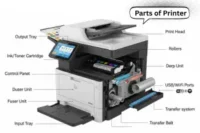
A printer makes text or pictures on paper in a simple way. A printer helps students, workers, and families create hard copies. A printer supports study work, office work, and shop work. A printer stays useful for every place that needs printed copies.
5 Types of Printers are included:
- Inkjet printer
- Laser printer
- Dot matrix printer
- Thermal printer
- Multifunction printer
5 Importance of Printer
- Helps users get paper copies fast.
- Helps schools print worksheets.
- Helps offices print daily reports.
- Helps shops print bills for customers.
- Helps designers print clear images.
5 Uses of Printer
- Used for homework printing.
- Used for photo printing.
- Used for form printing.
- Used for receipt printing.
- Used for poster and label printing.
Projector
A projector shows a big picture on a wall or screen. A projector helps in classes, meetings, and home movie setups. A projector makes small images look large for everyone to see clearly. A projector brings bright visuals to groups in one place.
5 Types of Projectors are included:
- LCD projector
- LED projector
- DLP projector
- Laser projector
- Short-throw projector
5 Importance of Projector
- Helps groups see large images easily.
- Helps teachers explain lessons clearly.
- Helps offices show presentations.
- Helps families enjoy movie nights.
- Helps trainers guide students with visuals.
5 Uses of Projector
- Used for watching films on a big screen.
- Used for teaching in classrooms.
- Used for business meetings and slides.
- Used for events and public programs.
- Used for training and workshops.
Speaker
A speaker is an output device that plays sound from a computer. It is used to hear music, voices, and other audio clearly. They are important for games, movies, and online lessons. There are many types of speakers that suit different needs.
5 Types of Speakers are included:
- Bookshelf speakers PC
- Surround sound speakers
- Gaming speakers devices
- Studio headphones PC
- Bluetooth / Wireless speakers
5 Importance of Speakers
- Helps users enjoy clear sound.
- Gives better audio in movies and games.
- Helps students hear lessons.
- Supports online calls and meetings.
- Helps people listen privately or in groups.
5 Uses of Speakers
- Used for music playback.
- Used in movies or videos.
- Used in gaming setups.
- Used in online lessons and calls.
- Used in alerts and notifications.
Headphones
Headphones are devices that give sound from a computer directly to the ears. They help users listen privately without disturbing others. Headphones are used in offices, schools, gaming, and music. They are easy to carry and work anywhere with a computer or mobile device.
5 Types of Headphones are included:
- Over-ear headphones
- On-ear headphones
- In-ear earbuds
- Noise-cancelling headphones
- Wireless headphones
5 Importance of Headphones
- They are useful for private listening.
- They give clear sound for study or work.
- They help gamers hear small sounds.
- They give music with better quality.
- They have comfort for long use.
5 Uses of Headphones
- Used for online classes and study.
- Used for gaming.
- Used for listening to music.
- Used for video calls and meetings.
- Used for watching movies quietly.
Voice Synthesizer
A voice synthesizer is a device that changes text into speech. It helps users hear words instead of reading them. This device is useful for students, workers, and people with special needs. Many modern computers and apps include voice synthesizers for easy learning and communication.
5 Types of Voice Synthesizers are included:
- Text-to-Speech (TTS) synthesizers
- Formant-based synthesizers
- Concatenative synthesizers
- Articulatory synthesizers
- Hybrid synthesizers
5 Importance of Voice Synthesizers
- Helps blind users hear text clearly
- Helps learners understand difficult words
- Helps teachers give lessons in audio form
- Helps devices speak instructions
- Supports accessibility in computers and apps
5 Uses of Voice Synthesizers
- Used in learning apps for students.
- Used in reading tools for visually impaired users.
- Used in talking assistants and smart devices.
- Used in customer support systems.
- Used in navigation apps to give directions.
Plotter
A plotter is an output device that draws large images, charts, and designs. It is mainly used in offices, engineering labs, and design studios. There are machines that work on paper and some that use special pens. They are very useful for accurate and large-scale printing.
5 Types of plotters are included:
- Pen Plotter
- Electrostatic Plotter
- Cutting Plotter
- Inkjet Plotter
- CAD Plotter
Importance of Plotters
- It is important for printing large designs accurately.
- They are useful in engineering and architecture.
- Then, they give precise drawing outputs for maps and plans.
- Here, designers can check layouts before printing.
- Other machines cannot match the detail of a plotter.
Uses of Plotters
- Used for architectural blueprints.
- Used in engineering design drawings.
- Used for maps and geographical charts.
- Used to print posters and banners.
- Used in CAD and vector-based designs.
Braille Reader
A Braille reader is a special output device for blind or visually impaired users. It shows computer text in raised dots that can be felt with fingers. This device helps users read and understand digital information. It is widely used in schools, offices, and libraries for accessibility.
5 Types of Braille Readers are included:
- Refreshable Braille Display
- Braille Note-Takers
- Portable Braille Devices
- Braille Embossers
- Electronic Braille Readers
5 Importance of Braille Readers
- Helps blind users read computer text.
- Enables students to learn and study effectively.
- Provides independence in reading messages and emails.
- Supports professional work for visually impaired employees.
- Improves access to digital content and libraries.
5 Uses of Braille Readers
- Reading books in Braille format.
- Accessing emails and online messages.
- Writing and taking notes in Braille.
- Using office software for work tasks.
- Learning and practicing Braille skills.
GPS Display
A GPS display shows maps, directions, and location information. It is used in cars, phones, and other devices where navigation is needed. They are helpful for travelers, delivery workers, and drivers. GPS devices have changed how people find places quickly and safely.
5 Types of GPS Display are included:
- Car GPS displays
- Handheld GPS devices
- Mobile phone GPS apps
- Bike GPS displays
- Marine GPS devices
5 Importance of GPS Display
- Helps users reach destinations safely
- Helps delivery workers find addresses
- Helps travelers save time
- Helps rescue teams locate people
- Helps drivers avoid traffic
5 Uses of GPS Display
- Used in cars for navigation
- Used in mobile phones for maps
- Used in bikes for route tracking
- Used in boats for marine navigation
- Used in logistics for delivery tracking
Touchscreen
A touchscreen is a display that allows users to interact directly with what is shown on the screen. It is commonly used in phones, tablets, and kiosks. They are very popular because they combine display and input in one device. Touchscreens have made computers and gadgets easier and faster to use.
5 Types of Touchscreens are included:
- Resistive Touchscreen
- Capacitive Touchscreen
- Surface Acoustic Wave (SAW)
- Infrared Touchscreen
- Optical Imaging Touchscreen
5 Importance of Touchscreens
- Helps users tap and swipe directly.
- Makes learning easier for kids.
- Helps workers use apps quickly.
- Gives a faster way to interact with devices.
- Saves space by combining display and input.
5 Uses of Touchscreens
- Used in smartphones and tablets.
- Used in ATMs and kiosks.
- Used in POS systems at shops.
- Used in educational smart devices.
- Used in interactive maps and info boards.
Smartboard
A smartboard is a modern digital board that shows lessons and presentations. It works as an interactive tool for teachers, students, and professionals. They are easy to use and can connect with computers or other devices. Here, users can touch, write, or control apps directly on the screen.
5 Types of Smartboards are included:
- Interactive Whiteboard
- Digital Touch Board
- LED Smartboard
- Multi-touch Display
- Portable Smartboard
5 Importance of Smartboards
- Helps teachers explain lessons clearly.
- Gives students a hands-on learning experience.
- Supports group discussions and teamwork.
- Improves classroom engagement.
- Helps save and share notes easily.
5 Uses of Smartboards
- Used in classrooms for teaching.
- Used in offices for presentations.
- Used in workshops for training.
- Used in meetings to share ideas.
- Used in online learning sessions.
Microfiche Reader
A Microfiche Reader is a device that shows tiny images from film sheets. It is used to view old records and documents quickly. They are helpful in libraries, archives, and research centers. Here, users can read detailed data that was gone from paper files.
5 Types of Microfiche Readers are included:
- Manual Microfiche Reader
- Automatic Microfiche Reader
- Computerized Microfiche Reader
- Rotating Microfiche Reader
- Film Projector Type Reader
5 Importance of Microfiche Readers
- Helps preserve old records.
- Provides quick access to archived documents.
- Supports researchers and students.
- Reduces physical storage space needs.
- Ensures accurate reading of tiny text.
5 Uses of Microfiche Readers
- Used in libraries to read old books.
- Used in research centers for historical data.
- Used in archives to check records.
- Used in newspapers for old editions.
- Used in legal offices to view past files.
OLED Display
An OLED display is a modern screen that gives bright colors and deep blacks. It is very thin and light, so many devices use it. There are screens where power saving is important, and OLED works well there. They are popular in phones, TVs, laptops, and other smart gadgets.
5 Types of OLED Display are included:
- AMOLED
- PMOLED
- Flexible OLED
- Transparent OLED
- White OLED (WOLED)
5 Importance of OLED Display
- Gives bright and clear colors.
- Saves power compared to other displays.
- Offers thin and lightweight screens.
- Works in curved and flexible devices.
- Shows deep blacks for sharp contrast.
5 Uses of OLED Display
- Used in smartphones.
- Used in TVs and monitors.
- Used in smartwatches.
- Used in tablets.
- Used in digital signage and gadgets.
CRT Monitor
A CRT monitor is an old type of computer display. It is heavy and uses a glass tube to show images. There are many colors and bright displays on CRT monitors. They are still used in some labs and retro setups where modern screens cannot go.
5 Types of CRT Monitors are included:
- Color CRT monitors
- Monochrome CRT monitors
- Shadow mask CRT monitors
- Aperture grille CRT monitors
- Trinitron CRT monitors
5 Importance of CRT Monitors
- They are reliable for long use.
- It is useful for bright and sharp colors.
- They give wide viewing angles.
- Here, they work well for old software.
- CRT monitors have less motion blur compared to early flat screens.
5 Uses of CRT Monitors
- Used in retro gaming setups.
- Used in science labs for experiments.
- Used in offices for testing old systems.
- Used in training centers for teaching basics.
- Used in museums to show old computer setups.
Advantages and Disadvantages of Output Devices of Computer
Output devices help a computer show information to users. It is how a computer shares text, images, sound, and other results. There are many types of output devices, each with its own role. They are used in offices, schools, homes, and labs where data needs to be seen, heard, or printed.
| 10 Advantages of Output Devices |
|---|
|
| 10 Disadvantages of Output Devices |
|---|
|
Conclusion
It is clear that output devices of computer help users see, hear, and print computer data. There are many types like monitors, printers, speakers, and projectors. They are important for work, study, gaming, and fun. Here, the right device can make tasks easier and faster. Other devices, like Braille readers, give support for special needs.
FAQs about Output Devices
There are many output devices of computers. Some common ones are monitors, printers, speakers, headphones, and projectors. They are used every day for work, study, and fun.
It is true that a touchscreen works as both input and output. They are used in phones, tablets, and ATMs. Here, users can see results and touch to control apps.
A laser printer uses a laser beam to make images on paper. First, it has a drum that receives the laser pattern. Then, toner sticks to the drum and transfers to the paper. Finally, heat fixes the image. They are fast and clear compared to other printers.
Monitor resolution is the number of pixels on a screen. It is measured in width × height. Higher resolution gives sharper images. There are different resolutions like 1080p, 4K, and retina displays.
Impact printers strike the paper with pins or hammers. Non-impact printers do not touch the paper directly. They are inkjet or laser printers. Here, non-impact printers are quieter and faster than impact types.
It is recommended to use high-refresh monitors and good speakers for gaming. They are bright and provide smooth visuals. Gaming headphones are also useful. Other devices like projectors may not be ideal for fast games.
A Braille display output helps blind users read text. It has small pins that rise to form letters. They are connected to computers or phones. Here, blind students and workers can read messages and documents.
It depends on the purpose. Projectors are good for large audiences, while monitors give sharper images for one user. They are both output devices. Then, the choice depends on space, brightness, and usage.
DPI (dots per inch) measures print quality. Higher DPI gives sharper text and pictures. There are printers with 300, 600, or 1200 DPI. They are important for photos, designs, and important documents.
Output devices give final results of computer processes. They are essential for seeing, hearing, or printing data. Here, users can interact with information. Other devices, like input tools, send data to the computer, while output devices show it.