What is Light Pen in Computer
Published: 7 Dec 2025
Tired of struggling with a mouse for drawing or selecting items on your computer? The lightpen solves that problem. It acts as a pointing device and allows precise control, making graphics, education, and interactive work easier for beginners and professionals alike.
Suppose you want to learn complete details about what is light pen and need more information about computers, monitors, computer types, parts, printers, hardware, and software. In that case, you can visit EC Science for all the information.
What is a Light Pen?
A light pen is a computer input device that allows users to point, select, and draw directly on a screen. It is similar to a stylus input device, but it works specifically with screens like CRTs. A light pen acts as a pointing device and can replace a mouse in many tasks.
In simple words, a lightpen is like a pen for your computer. You can touch the screen, and it responds. Light pens are small, lightweight, and easy to handle. They are also sometimes called lightpen stylus.
History of the Light Pen
The idea of the light pen came when people wanted a simple way to interact directly with a computer screen. It is a device that allows users to point, select, and draw on the screen without using a keyboard or mouse.
The first lightpen was invented in the 1950s. Tom Ellis made it to the Royal Radar Establishment in the United Kingdom. At that time, computers had large CRT screens, and it was hard to select things on the screen using traditional tools. This gave rise to the idea of a pen that could detect light from the screen.

The first light pen was simple. It is basically a small tube with a light-sensitive detector at the tip. When the pen touched the screen, it could detect the light and tell the computer where the user was pointing. It was not very fast, and the screens were bulky, but it was a big step forward.
Then, as computers developed, light pens also got updated. They became lighter and easier to hold, making them more comfortable for drawing and pointing. Screens changed, too, and the pens had to be adjusted to work with new types of displays. Other improvements included better accuracy and faster response times.
Over time, lightpens were used across many areas, including graphic design, education, and industrial applications. They are still essential to understand because they introduced the world to interactive screens and pen-based computer systems.
How a Light Pen Works
A lightpen is an input device that allows users to point, select, and draw directly on a computer screen. It is designed to detect the light emitted by the display. There are small sensors in the tip of the pen, which sense the exact position on the screen where it touches.
They are connected to the computer through a wire, or wirelessly, so the computer can understand the pen’s movements. Then the computer calculates the location of the pen and performs the action, such as drawing a line or selecting an object.
Other devices, like a mouse or touchscreen, also provide input, but the light pen gives more precise control for drawing and graphics. Here, the main theme is accuracy, because the pen responds exactly where it touches the screen.
When the pen touches a bright spot on the screen, the sensor detects it and sends a signal to the computer. If you want to draw or select something, the light pen works instantly. How it works is simple: it senses light, tells the computer the position, and the action appears on the screen.
Types of Light Pen
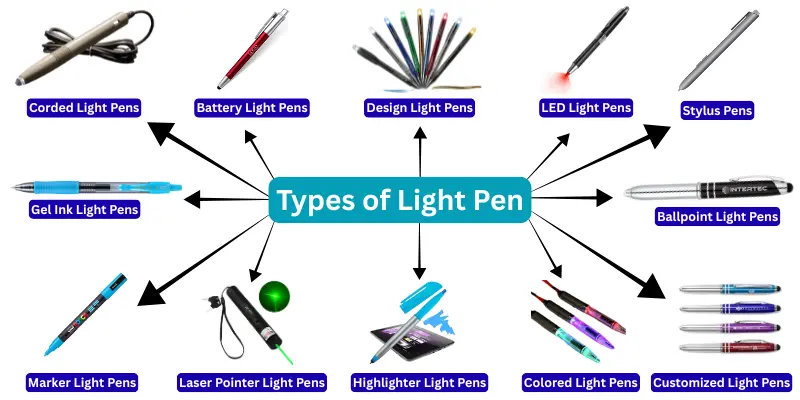
When we talk about types of light pens, it is important to know that they are not all the same. There are different designs, colors, and purposes depending on how they are used. Here are the main types:
1. Corded Light Pens
Corded light pens are connected to a computer with a wire. It is reliable because there is no battery to drain. They are mainly used in pen-based computer systems where precise input is required. When drawing or selecting items, they provide steady performance.
2. Battery Light Pens
Battery light pens work without a cable. It is convenient for portable use or when a user moves between screens. They are often used in computer light pen drawing and interactive learning. Other users prefer them for quick sketches and input tasks.
3. Design Light Pens
Design light pens are specially made for artists and designers. It is used to create digital sketches and precise illustrations. They are popular in light pens in computer graphics tasks where accuracy matters. Then, they can also act as a stylus input device.
4. LED Light Pens
LED light pens use LED lights to detect positions on the screen. It is bright and easy to use even in low-light conditions. They are common in pen computers and educational setups. Other users enjoy using them for interactive games.
5. Stylus Pens
Stylus pens are like modern lightpens. It is compatible with touchscreens as well as older CRT displays. They are used for drawing, selecting, and writing digitally. Then, they are also used in classrooms and professional design work.
6. Ballpoint Light Pens
Ballpoint light pens are simple pens that serve as pointing devices for specific screens. It is used where both writing and drawing are needed. They are often used in offices or interactive systems. Other users choose them for accuracy in selections.
7. Gel Ink Light Pens
Gel ink light pens are designed to combine ink drawing with digital input. It is smooth to hold and precise when drawing. They are used in computer light-pen drawing for art and design. Then, they help beginners learn drawing digitally.
8. Marker Light Pens
Marker light pens are thicker and easier to see on screens. It is used in classrooms and presentations to highlight or point. They are compatible with pen-based computer systems for interactive tasks. Other users like them for quick selections.
9. Laser Pointer Light Pens
Laser pointer light pens use a laser to show positions on the screen. It is useful in meetings or teaching sessions. They are mostly used for pointing and selecting items at a distance. Then, they can also act as a stylus input device for large screens.
10. Highlighter Light Pens
Highlighter light pens are designed to highlight selections on digital screens. It is bright and attracts attention easily. They are used in presentations, teaching, and computer light-pen drawing. Other users like them for quick emphasis on important points.
11. Colored Light Pens
Colored light pens are available in multiple colors. It is fun for drawing, art, and interactive learning. They are used in classrooms and design work. Then, they also help in pen computers for better visual distinction.
12. Customized Light Pens
Customized light pens are designed according to user needs. It is helpful when specific functions or colors are needed. They are used in education, design, and professional environments. Other users choose them for personal or brand-based preferences.
Parts of Light Pen
A lightpen in a computer is a small, handy device with several essential parts that make it work. They are simple to understand and help in drawing, pointing, and selecting items on the screen.
1. Tip of the Light Pen
The tip is the most essential part. It is the part that touches the screen and senses light. When the tip detects light from the monitor, the computer knows exactly where you are pointing. This is how a light pen acts as a pointing device.
2. Body of the Light Pen
The body is the part you hold. It is usually a lightweight pen that is comfortable to use for a long time. The body also houses internal circuits that connect the tip to the computer. They are vital because they make the pen strong and easy to handle.
3. Cable or Wireless Receiver
Some light pens have a cable, while others work wirelessly. It is this part that sends signals from the pen to the computer. Here, the computer interprets the pen’s input and acts.
4. Button
Some lightpens come with a button on the body. They are used to perform additional actions, such as clicking or selecting items. When pressed, the pen can act like a mouse, but it is more precise for drawing or graphics.
5. Internal Circuit
Inside the light-pen, there is a small electronic circuit. It is responsible for sending the signals from the tip to the computer. Without this circuit, the pen cannot communicate with the screen or software.
Diagram of Light Pen
A diagram of a light pen in a computer helps users understand how it works. It is easier to see the parts when they are shown visually. They are simple but essential for the functioning of a light pen.
Parts Shown in the Diagram
- Tip: It is the part that detects light from the screen.
- Body: The body has circuits and internal support for easy handling.
- Cable or Wireless Receiver: It is used to send signals to the computer.
- Button: They are used for extra functions, such as selection or clicking.
- Internal Circuit: It is responsible for sending information from the tip to the computer.
A diagram of a lightpen usually labels all these parts clearly. Here, it shows how the tip, body, button, and circuit are connected. A clear diagram helps beginners and students understand the function of the light-pen easily.
Applications of Light Pen
A light pen in a computer is an innovative input device that allows users to interact directly with the screen. It is a small, lightweight tool that acts as a pointing device and can be used for drawing, selecting, and controlling applications. They are easy to use in pen-based computer systems and computer light pen drawing, making work more precise and interactive. In addition to graphics, it is also used in education, technical fields, and creative tasks where accuracy matters.
Applications of Light Pen
- Computer Graphics: They are used in computer lightpen drawing to create sketches, diagrams, and digital artwork.
- Interactive Education: It is used in schools and training centres for writing or pointing on digital boards.
- Technical Work: Engineers and designers use lightpen input devices for precise selections and measurements.
- Gaming: They are applied in games that need direct interaction and accurate control.
- Medical & Diagnostic Tools: Diagnostic pen lights are used in hospitals for quick, accurate detection.
- Art & Sketching: Stylus pens, types of light, and sketch types of lightpens help artists create digital illustrations directly on screens.
- Presentation & Laser Pointing: Laser pointers, types of light-pens, are used to highlight and control slides.
- Highlighting & Marking: Highlighters, types of lightpens, and markers, types of light pens, are used for notes or annotations.
- Customized & Professional Use: Customized types of lightpens, fine-point types of light-pens, and adult types of light-pens are used for specialized tasks.
Color-Coded Tasks: Blue types of lightpens, pink types of lightpens, and black types of lightpens are applied where color distinction is needed.
Features of Light Pen
A lightpen is a small, lightweight device that lets users interact directly with a computer screen. It is designed to act as a pointing device, making it easier to select objects or draw. There are many features that make light pens unique and useful for various tasks in computer graphics and pen-based systems.
1. Precise Input
They are very accurate when it comes to pointing or drawing on the screen. Here, the lightpen helps in computer lightpen drawing and allows precise selection, which a mouse cannot always do.
2. Works as a Stylus
Some lightpens also act as a light-pen stylus. If you are familiar with stylus input devices, then you know how useful they are for design and interactive work. What a stylus is in a computer can be explained by how a light pen functions similarly.
3. Lightweight and Easy to Use
It is a lightweight pen, making it easy for users to hold for long periods. Where drawing and pointing are required, a light pen provides comfort and convenience.
4. Compatible with Pen-Based Systems
They are used in pen-based computer systems and 5 pen PC technology, allowing users to operate computers without a keyboard or mouse. Then, it can be integrated for educational, graphic, and industrial applications.
5. Multiple Uses
They are versatile. For example, a lightpen can be used in computer graphics, interactive screens, and digital drawing. Here are 5 uses of light pen and 10 uses of light pen in classrooms, design studios, and gaming setups.
6. Different Types Available
There are types of light pens, such as sketch, laser pointer, highlighter, and gel-ink. Then users can choose based on their needs, budget, and purpose. Lightpens for computers are also made for specialized tasks.
7. Visual Feedback
It is useful because they are often combined with light pen diagrams or diagrams of a light pen in a computer to show precise points on the screen. Pictures of lightpens, light-pen photos, and computer lightpen images help beginners understand how to use them.
8. Affordable Options
There are types of lightpens under $8, and other cost-effective options. Then, users can select the types of light pens they have used or new types of light pens depending on their preference.
9. Customization
They are available in customised types of light pens, adult types of light pens, and in different colours, such as blue, pink, or green. It is easy to find one suitable for personal use.
10. Multipurpose Functionality
Here, light-pens can also serve as flashlight types of light pens or diagnostic pen lights types of light pens, making them multifunctional tools beyond just computer use.
Advantages and Disadvantages of Light Pen
Using a light pen in computers has both benefits and some limitations. It is easy to handle, precise, and works well in pen-based computer systems. There are also some challenges users should be aware of before using a lightpen.
| Advantages of Light Pen |
|---|
|
| Disadvantages of Light Pen |
|---|
|
Conclusion
It is clear that a light pen is an important input device for computers. They are used to draw, select, and interact directly with screens. There are many types of lightpens, such as stylus pens, sketch-type light pens, gel-ink-type light pens, laser-pointer-type light pens, and flashlight-type light pens.
Then, light-pens are useful in computer graphics, computer light-pen drawing, and pen-based computer systems. Other examples, like a picture of a lightpen, a diagram of a lightpen in a computer, and computer lightpen images, show how they work. If someone knows what a lightpen is and its uses, they can easily understand its role today.
A lightpen in a computer is an input device that allows users to point, select, and draw on the screen. It serves as a pointing device and works with certain display types in pen-based computer systems.
They are designed to detect light from the screen. When the tip touches the screen, it sends signals to the computer. This is why computer lightpen drawing and other interactive tasks are possible.
There are many uses of a light pen. It is used for drawing, selecting objects, learning in classrooms, and designing graphics. You can also find its use in pen computers and other pen-based computer systems.
A light pen input or output question is simple. It is strictly an input device because it sends data to the computer rather than receiving it.
There are many types of light pens in computers. Some common types include brand types of light pens, ballpoint types of light pens, stylus pens types of light, gel ink types of light pens, laser pointers types of light pens, and even sketch types of light pens for designers.
It is similar, but there is a difference. A stylus input device works on touchscreens, whereas a light pen works with screens that emit light. They are both pen-based input tools, but their functioning is different.
There are many types, including white, black, pink, blue, green, and specialized pens like diagnostic pen lights.
It is affordable for basic models, while advanced types may cost more. Some lightpens under $8 are available for beginners, while professional or customised models may be more expensive.
They are excellent for light-pen drawing. Many artists and designers use sketching pens & marker types of light to create precise digital artwork. Computer lightpen images show how accurately they can work on screens.
Here, you can find a diagram of a lightpen in a computer and a lightpen photo online. These show how a light pen works and its structure, helping beginners understand its parts and uses.