What Is RAM – Boost Your Device Speed with Confidence
Published: 18 Nov 2025
Many users feel upset when a device freezes during school work, watching videos, or playing games, and slow speed becomes a daily issue. These issues lead people to wonder about “What is RAM?” and why the system struggles. This tutorial explains RAM in clear, simple terms, and it helps readers learn how RAM works inside a device. The guide also shows the differences between RAM and ROM so users avoid mix-ups and understand the differences between both memory types with ease.
What Is RAM?
Random Access Memory (RAM) is a hardware component in a computer that acts as its short-term memory. It is volatile storage, which means data in RAM disappears when the power goes off. There are tiny circuits, or memory chips, inside each RAM module (sometimes called a memory module) that let the CPU read and write data very quickly. Because it is read-write memory, the processor can grab information and change it in RAM almost instantly. In short, RAM is the main memory that keeps track of all the tasks a computer is doing right now.
Why Is RAM Important?
When someone opens an app, like a game or a video editor, the computer needs enough RAM to manage the work smoothly. If the RAM is full, the system has to keep moving data between the processor and storage to finish the task. Think of it like carrying too many books at once; you would have to keep putting some down and picking others up.
In the same way, when RAM is small, the computer moves data back and forth between the hard drive, RAM, and CPU, which slows everything down. They are small delays, but together they can make programs feel sluggish. Enough RAM will give the system a faster, smoother experience and help users do more tasks at the same time.
History of RAM
Random Access Memory has a long story, and it is rooted in early computer science. In the 1950s, there were magnetic-core memories, tiny rings of magnetic material threaded with wires. In those days, engineers at MIT, led by Jay Forrester, developed a magnetic core structure that gave computers fast, reliable access to data. This innovation gave rise to the first practical RAM devices, and it set a theme in motion for faster, more flexible memory.
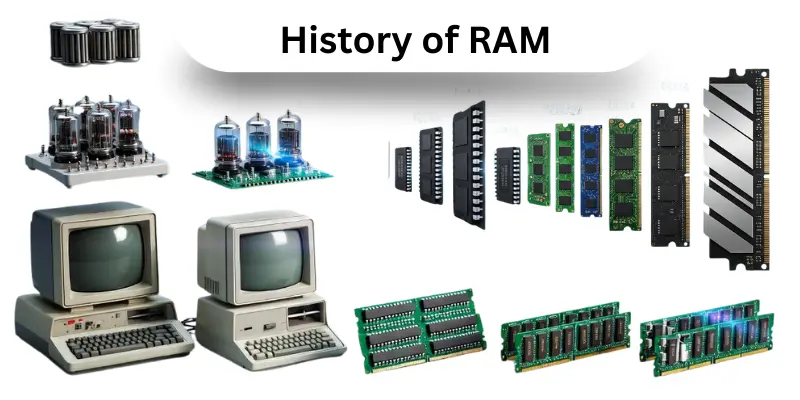
Later, in the 1960s, there was a big shift: the invention of MOS (metal‑oxide‑semiconductor) memory. Researchers at Fairchild Semiconductor developed MOS transistors and built the first MOS RAM chips. This made memory cheaper, faster, and easier to mass-produce.
Then came Dynamic Random Access Memory (DRAM). It was invented by Robert Dennard in 1968, and it used a single transistor plus a tiny capacitor to store each bit. Because the capacitor slowly leaks its charge, DRAM needs to be refreshed again and again, but this trade-off allows much higher density. In 1970, Intel released the first commercial DRAM chip, the Intel 1103, which replaced older core memory in many computers.
As computing power grew, there was demand for even faster memory. In the early 1990s, SDRAM (Synchronous DRAM) emerged. Samsung introduced a 16 Mb SDRAM chip, which worked in sync with the system clock. This made data access smoother, and then engineers created even better forms.
By 1998, DDR RAM (Double Data Rate SDRAM) arrived. It could send data on both the rising and falling edges of the clock signal, which doubled performance without raising clock speed. Over time, DDR evolved into multiple generations of DDR2, DDR3, DDR4, and now DDR5, each giving higher memory speed, better system performance, and more efficient power use.
Today, RAM is a main memory unit inside almost all computers, smartphones, and servers. It is gathered in compact memory modules, and it is built on memory chips that are more powerful than ever. While the early magnetic-core technology is largely gone, its legacy lives on in every modern memory design.
Evolution of RAM Technology
Random Access Memory (RAM) has changed a lot over time. At first, there was simple DRAM. Then, in the 1990s, SDRAM (Synchronous DRAM) arrived. It is faster than older types because it works in sync with the system clock. It is also more efficient.
After SDRAM, there came DDR RAM or Double Data Rate SDRAM. This was a big jump. With DDR, data moves twice as fast because it sends information on both the rising and falling edges of the clock cycle. Then new versions came: DDR2, DDR3, DDR4, and now DDR5. Each generation gave higher speed, more capacity, and lower power use.
For example, DDR2 lowered the voltage so devices used less power. Then DDR3 improved bandwidth and also lowered the voltage further. DDR4 brought in much bigger modules, and then DDR5 added advanced features like built-in power management to handle higher capacity. Over time, RAM modules have become smarter, faster, and able to store many more Gigabytes.
The theme of this evolution has always been “faster and more efficient memory.” As technology grew, RAM did not just get faster; it also became more capable of giving a better System Performance. There are now memory chips that were once impossible, but they are here and helping modern computers do more.
Timeline of RAM Evolution
| Year | RAM Type | Description & Uses |
|---|---|---|
| Mid‑1990s | SDRAM | This was one of the first synchronous memories. It is made to match the CPU clock. There are no fancy double rates yet, but it gives better performance than older DRAM. It is used in early PCs for general computing. |
| 2000 | DDR (DDR1) | This version makes data transfer faster and lowers the operating voltage. It uses a four‑pre‑fetch architecture, and it helps with tasks that need more memory bandwidth. Devices like early laptops and desktops used it a lot. |
| 2003 | DDR2 | First DDR generation. It is the first DDR RAM that doubles the data rate by using both edges of the clock. It gives faster data access than SDRAM. People used it in desktop PCs. |
| 2007 | DDR3 | The chips become more power-efficient (voltage is lower) and support more capacity. It is great for multitasking, gaming, and work computers. There are bigger memory modules available. |
| 2014 | DDR4 | This version makes data transfer faster and lowers the operating voltage. It uses four‑pre‑fetch architecture, and it helps with tasks that need more memory bandwidth. Devices like early laptops and desktops used it a lot. |
| 2020 | DDR5 | The latest generation. It is made for future‑ready systems. They are faster, more efficient, and support larger Memory Capacity per module. It also has built‑in power regulation so other parts of the memory module run smoothly. |
How Does RAM Work?
RAM is a fast workspace inside a computer. It is made of tiny memory chips, and there are millions of cells that store data as 0s and 1s. They are organized in a grid so the CPU can quickly read or write information.
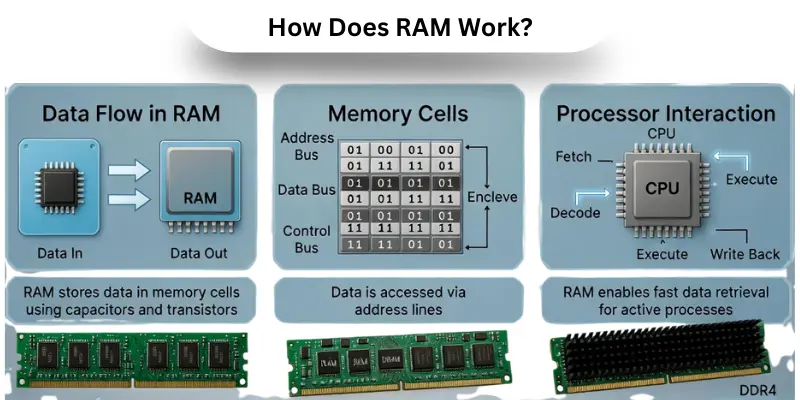
When a program runs, RAM keeps its data ready for fast data access. Then, the CPU can get what it needs without waiting. Other storage, like hard drives, is slower, and cache memory inside the CPU helps with very quick tasks.
Because RAM is volatile storage, if the power goes off, data is lost. It is the main memory that helps apps run smoothly and makes multitasking easy. Here, the theme of RAM is speed and efficiency, giving the CPU space to handle tasks fast.
Types of RAM
RAM comes in different types, and each type is designed for a specific use. It is a temporary workspace where the computer stores active data for fast access. There are faster and slower versions, and they are used in computers, graphics cards, mobile devices, and special systems. Then, knowing these types helps users choose the right RAM for their needs. Here are common types of RAM included:
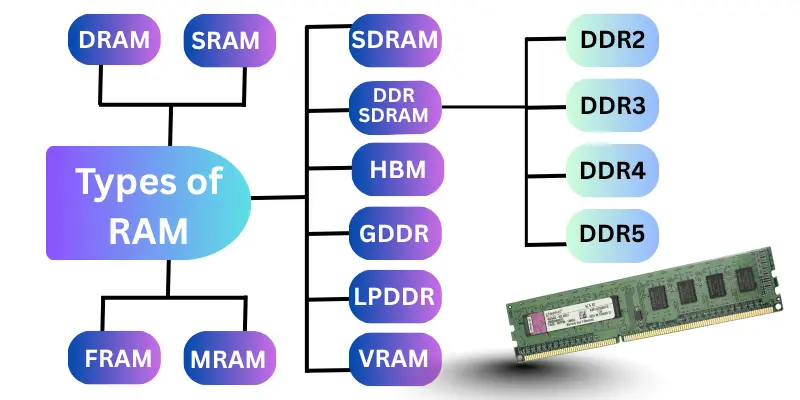
- Dynamic Random Access Memory (DRAM)
- Static Random Access Memory (SRAM)
- Synchronous Dynamic RAM (SDRAM)
- Double Data Rate SDRAM (DDR SDRAM)
- DDR2
- DDR3
- DDR4
- DDR5
- Graphics Double Data Rate (GDDR)
- Low Power Double Data Rate (LPDDR)
- Video Random Access Memory (VRAM)
- HBM (High Bandwidth Memory)
- Ferroelectric RAM (FRAM)
- Magnetoresistive RAM (MRAM)
- Non-Volatile RAM (NVRAM)
How Much RAM Do You Need?
Choosing the right amount of RAM helps the computer run smoothly. If someone picks too little, the system slows. If they pick too much, they may waste money. Here are easy guidelines for how much RAM different users need, based on what they actually do.
Recommended RAM Sizes
- 4 GB: It is enough for light browsing and document work.
- 8 GB: They are ideal for everyday apps, videos, and emails.
- 16 GB: It is perfect for gaming, school software, and multitasking.
- 32 GB: They are for creators, heavy apps, and large projects.
- 64 GB+: It is best for virtual machines, big data, and pro work.
How Is RAM Different From Hard Drive Memory?
RAM and hard drives serve very different roles in a computer. It is the job of RAM to hold active data for quick use, while a hard drive stores large files more permanently. There are parts inside both devices, but they serve other purposes. Understanding their difference gives a clear picture of how a system works.
| Feature | RAM | Hard Drive Memory |
|---|---|---|
| Volatility | It is volatile: data is lost when power goes off. | It is non-volatile: data stays even when the computer shuts down. |
| Speed / Performance | Very fast data access helps the CPU work smoothly. | Much slower access; good for long-term storage, not for real-time processing. |
| Role | Acts as Main Memory, storing running programs and tasks. | Acts as a bulk storage for files, documents, installations, and OS. |
| Data Storage | Holds temporary data used right now. | Keeps data for long-term use. |
| Upgrade Effects | More RAM gives more space for multitasking and faster performance. | More storage gives more space for photos, videos, and large files. |
How Is RAM Different From Virtual Memory?
Virtual memory is a trick that operating systems use when physical memory is low. When RAM fills up, the system then borrows space on storage and treats it like memory. They are not the same, though, and each has a different impact on other parts of the system. This separation makes it easier to understand why performance slows down when the system relies on virtual memory.
| Feature | RAM | Virtual Memory |
|---|---|---|
| Physical vs. Logical | It is volatile: data disappears when the power is off. | It is real, physical memory installed in the system? |
| Speed | Very fast access, ideal for active computing. | Much slower, because accessing storage is slower than accessing RAM. |
| Volatility | Helps when RAM is full by giving extra space, but it slows performance. | Is also non-volatile in storage but volatile when used as virtual memory (depends on swap file). |
| Purpose | Provides fast space for tasks and programs running now. | It is also non-volatile in storage but volatile when used as virtual memory (depends on the swap file). |
| Effect on Performance | High RAM gives smooth multitasking. | Is it real, physical memory installed in the system? |
How Is RAM Different From Flash Memory?
Flash memory lives in USB drives, SSDs, and memory cards. Here, it is used for storing files for a long time. They are more permanent than RAM and serve a different part of the system. Understanding this difference shall help someone pick the right kind of memory for their needs.
| Feature | RAM | Flash Memory |
|---|---|---|
| Volatility | Is volatile: data is lost when there’s no power. | It is volatile: data is lost when there’s no power. |
| Speed | Very fast for active data access. | Slower than RAM, but much faster than old hard drives. |
| Purpose | Stores data for running applications. | Stores files, photos, and software long-term. |
| Structure | Built with memory cells that refresh often. | Built with flash cells that store charge without refreshing. |
| Use Cases | Ideal for multitasking and system performance. | Ideal for portable storage, SSDs, and file backup. |
Difference Between RAM and ROM
RAM and ROM look similar on the surface because both are memory chips, but they serve very different jobs. There are clear roles for each: RAM supports active tasks, and ROM holds data that the computer shall always have. Knowing this helps people understand how the system boots up and stays stable.
| Feature | RAM | ROM |
|---|---|---|
| Volatility | It is volatile: data clears when the power goes off. | It is non-volatile: data stays even after shutdown. |
| Purpose | Used for Read Write Memory, storing active data. | Mostly for read-only data, like firmware or boot instructions. |
| Modifiability | Can read and write data many times. | Usually cannot be rewritten or is overwritten rarely. |
| Role in Boot | Helps run programs once the OS is up. | Helps start the system by storing the initial code needed for boot. |
| Speed | Very fast read and write. | Slower for writing, but good for stable, long-term storage of essential code. |
Cost of RAM
The cost of RAM depends on several factors. There are different types, like DDR4 or DDR5, and newer versions cost more because they are faster and more advanced. It is also true that the Memory Capacity (measured in Gigabytes) greatly affects price; a 16 GB module costs more than an 8 GB stick. They are also built by different brands, and premium brands with high Memory Speed and low Latency Timing ask for a higher price.
Then, market demand plays a role: when many users upgrade, prices go up. Other factors like voltage, manufacturing cost, and support for high-end motherboards also shape the price. If someone wants to do a Memory Upgrade, they must balance how much they pay with how much performance they will get. Here, the theme is value versus speed. Paying more only makes sense when the extra RAM or speed truly improves system performance.
Features of RAM
RAM is an essential part of every computer, and it is designed to make systems fast and responsive. There are several important features that decide how well RAM performs, and they are useful for students, gamers, and professionals alike. Here, the theme is speed and smooth performance, helping computers handle multiple tasks without delay.
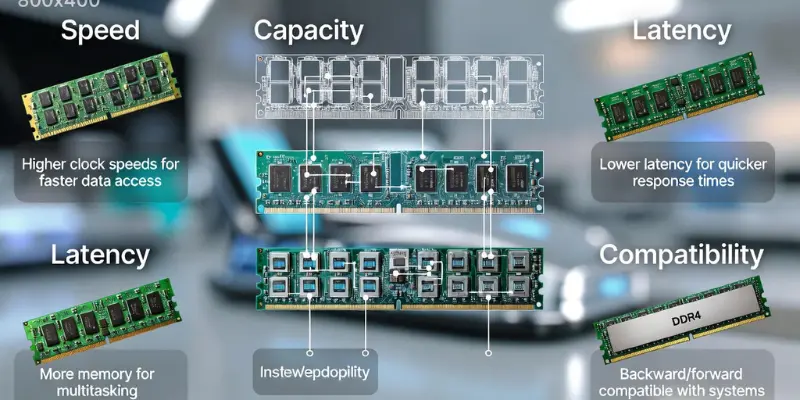
Key Features of RAM:
- Fast Data Access
- Good Memory Capacity
- Strong Memory Speed
- Low Latency Timing
- Support for many apps
- Easy Memory Upgrade option
- Works with Cache Memory for faster response
Advantages and Disadvantages of RAM
Random Access Memory is a powerful part of a computer’s hardware. It is a fast workspace for running programs, and there are many benefits to having more of it. At the same time, there are some trade‑offs to consider. In this section, we’ll explore the advantages and the disadvantages of RAM and give a clear picture of why and where RAM helps, and what its limits are.
| Advantages of RAM |
|---|
|
| Disadvantages of RAM |
|---|
|
Conclusion
So friends, it’s time to wrap up! In this article, we have explained what is RAM and how it helps your computer work faster. It is always smart to pick a device with enough RAM for your tasks or games. There are many types and sizes, and they are designed to make apps run smoothly and multitasking easier. Then, having the right RAM can save you from frustration and slow performance. Here, the theme is simple: more suitable RAM means a faster and better computer experience.
FAQs About RAM
The main function of RAM is to store data temporarily so the CPU can access it quickly. They are used for fast read-write memory and help improve system performance. Here, the theme is speed: the bigger and faster the RAM, the smoother apps run.
Computers, laptops, smartphones, and tablets all use RAM. They are essential for programs, games, videos, and operating systems. Other applications that need quick response also rely on RAM for data access.
RAM itself cannot be permanently infected, but if malware runs, it temporarily uses RAM to operate. Once the system is shut down, malicious code in RAM is gone. It is one reason why RAM is considered temporary memory.
RAM is volatile, so all data disappears if power goes off. They are very fast but cannot store files long-term. Other storage drives, like SSDs or HDDs, keep data safe when the computer is off. Then, RAM and storage work together for a smooth experience.
No, not all RAM types are compatible. There are different generations like SDRAM and DDR RAM (DDR3, DDR4, DDR5). Here, the CPU and motherboard determine which RAM can work. Using the wrong type may prevent the system from starting.
It is helpful if your system runs slowly or apps freeze. More RAM gives space for multitasking and faster data access. They are also useful for gaming, video editing, or running multiple programs at once.
RAM is usually installed in memory modules on the motherboard. They are long sticks that fit into special slots near the CPU. Here, the theme is organization: the placement lets the processor reach memory quickly.
Yes, most computers allow a memory upgrade. They are added by inserting compatible RAM modules into free slots on the motherboard. Then, the system can use more Memory Capacity, improving system performance.