What is CRT Monitor – Uses, Types & Working Explained
Published: 16 Jan 2026
What is CRT monitor, and why does it look different from modern screens? Many learners see this old display and feel unsure about its purpose. A CRT monitor uses cathode ray tube technology to show images. This screen type once served as the main display for computers and TVs.
What Is CRT Monitor?
CRT stands for Cathode Ray Tube. A CRT monitor is an old type of monitor. It uses a cathode ray tube monitor system to show text and images. This screen works by sending tiny electron beams onto a glass surface. The light created on the CRT display forms pictures and words. Many people also call it a tube monitor or computer monitor tube.
History of CRT Monitors
The history of the CRT monitor starts in the late 1800s. Scientists studied how electrons move inside glass tubes. This research led to the invention of the cathode ray tube. At that time, the goal was to show light patterns using electron beams. This discovery later became the base of the cathode ray tube monitor used in computers and televisions.
1. Who Invented the CRT Monitor
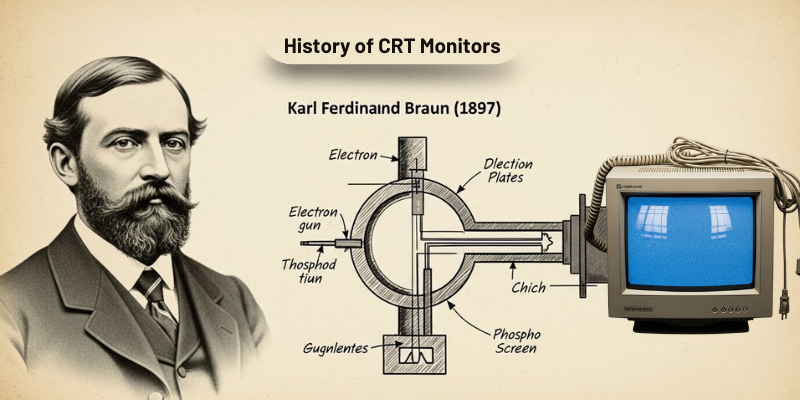
Karl Ferdinand Braun discovered the cathode ray tube in 1897. He created the first working CRT device. Because of his work, the tube became known as the Braun tube. His invention made it possible to build the first CRT display systems. Later engineers improved this idea and used it in the first computer display.
2. Why CRT Monitors Were Needed
Early computers needed a visual output device. Printers and paper were slow and limited. This problem created the need for a screen that could show text and images instantly. The CRT computer monitor solved this issue. It allowed users to see data directly on a CRT screen. This feature made computers easier to use and more practical.
3. CRT Monitors in Early Computers
During the early computer era, CRT monitors became the standard display. These screens worked well with large computer systems. Many early CRT computer screens showed only text. Over time, color support improved. This development helped CRTs gain popularity in offices and research centers.
4. Growth During the 1990s
The 1990 computer monitor market was dominated by CRT technology. Almost every desktop system used a CRT desktop monitor. These monitors offered better resolution and color accuracy. The CRT monitor display also supported higher refresh rates, which improved image stability.
5. Updates and Improvements in CRT Monitors
Over the years, engineers improved CRT display screen quality. Color CRT monitors replaced monochrome models. Screen sizes increased. Image sharpness improved. Some CRT flat panel designs appeared, but depth remained large. These updates made CRTs suitable for gaming, design, and office work.
6. Decline of CRT Monitors
As technology advanced, new display types emerged. LCD and LED screens offered thinner designs and lower power use. Because of size and weight issues, CRT cathode ray tube monitors slowly disappeared from the market. Today, CRTs remain part of computer history and learning materials.
Parts of CRT Monitor
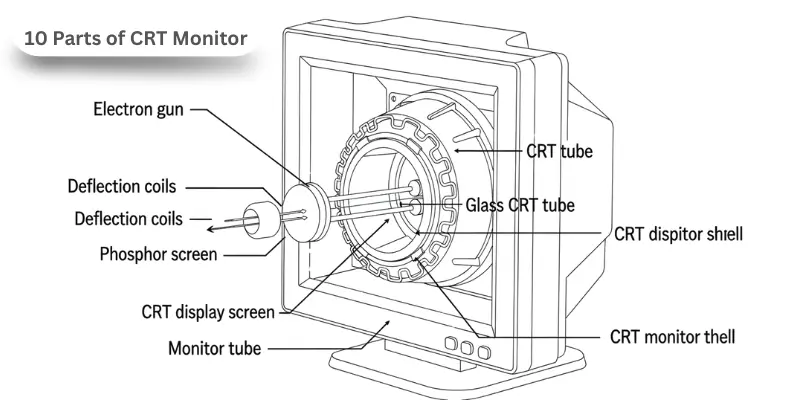
A CRT monitor has several important parts that work together to display images clearly. These parts make the monitor function properly, and each component plays a special role in creating visuals on the CRT screen. Below are the main parts of a CRT monitor:
Here are 10 Parts of CRT Monitor
- Electron gun
- Phosphor screen
- Deflection coils
- Glass CRT tube
- CRT display screen
- CRT tube
- CRT cathode ray tube monitor components
- CRT monitor shell
- Monitor tube
- CRT monitor diagram
How Does a CRT Monitor Work?
A CRT monitor uses cathode ray tube technology to show images and text on a screen. It may look like a big, heavy box, but the process inside is simple and clever. Here explain how it works in details:
- Electron Gun Releases Electrons: Inside the CRT computer monitor, a tiny electron gun shoots electrons toward the screen. These electrons are the key to forming the images.
- Deflection Coils Guide the Beam: The CRT monitor has deflection coils that move the electron beam in the right direction. They ensure electrons hit the exact spot on the screen.
- Electrons Hit the Phosphor Screen: The inside of a CRT screen is coated with a phosphor layer. When electrons hit it, the screen lights up, creating images.
- Color Creation (for Color CRT Monitors): A color CRT monitor has red, green, and blue phosphors. Different combinations of these colors form all the visuals on the screen.
- Scanning the Screen: The electron beam moves from top to bottom and side to side quickly. This is called scanning, and it happens many times per second. It produces a smooth CRT monitor display.
- Refreshing the Image: The refresh rate tells how fast the CRT screen redraws the image. High refresh rates make visuals clear and reduce flickering.
- Signals from the Computer: The computer sends information to the CRT computer monitor. The monitor converts these signals into electron movements, forming pictures and text.
- CRT Monitor Display Completion: Finally, the beam lights up the right CRT display screen points. Then, users see clear images, graphics, and text on the monitor.
Types of CRT Monitors
There are different kinds of CRT monitors, each designed for a specific purpose. CRT monitors come in different designs and styles, each made for specific uses. They are all based on cathode ray tube technology, but some focus on color, shape, or function. Understanding these types helps users know which CRT display suits computers, gaming, or television. Below are the main types of CRT monitors:
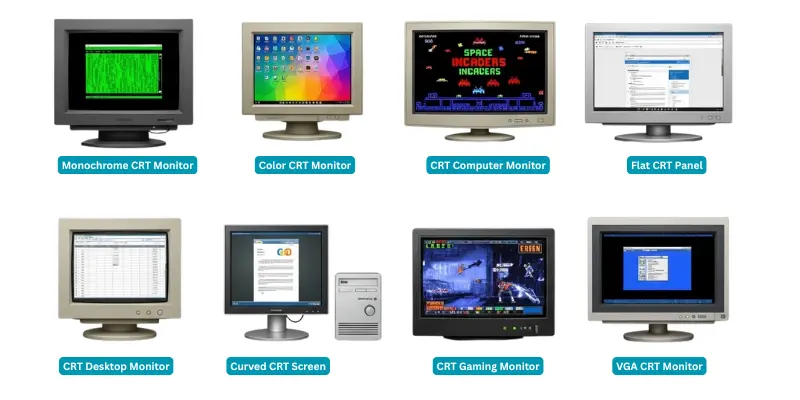
8 Types of CRT Monitors:
- Monochrome CRT Monitor
- Color CRT Monitor
- Curved CRT Screen
- Flat CRT Panel
- CRT Desktop Monitor
- CRT Computer Monitor
- CRT Gaming Monitor
- VGA CRT Monitor
Functions of CRT Monitor
A CRT monitor has an important role in computers and TVs. It shows images, text, and videos on the CRT display screen. Here are 10 functions of CRT monitor, including.
- Displaying text from the computer.
- Showing images and graphics clearly.
- Supporting color and monochrome visuals.
- Displaying videos and animations.
- Helping in CRT in computer graphics for designers.
- Providing fast refresh for smooth motion.
- Displays colors with tiny light spots.
- Works in various screen sizes.
- Keeps images stable without flicker.
- Links easily to computers and gaming consoles.
Uses of CRT Monitors
People used CRT monitors in homes, offices, and schools before flat screens became popular. These monitors were large and heavy, but they displayed clear text, images, and videos. CRT monitors were helpful for computers, gaming, and design work in real life.
10 Uses of CRT Monitors
- Displaying text on computers.
- Showing images and graphics clearly.
- Watching videos and movies.
- Playing video games with fast response.
- Supporting computer graphics and design work.
- Used in offices for data entry and work.
- Teaching and learning in schools.
- Showing scientific visuals in labs.
- Connecting to game consoles for retro gaming.
- Serving as CRT TVs for home entertainment.
Advantages and Disadvantages of CRT Monitors
Many people get confused about the advantages and disadvantages of CRT monitors. They had many advantages like clear images and accurate colors, but they also had drawbacks such as being bulky and heavy. Here are explain pros and cons of CRT monitors in details.
| 10 Advantages of CRT Monitors |
|---|
|
| 10 Disadvantages of CRT Monitors |
|---|
|
Conclusion
A CRT monitor was an important display device in early computers and televisions. It used cathode ray tube technology to show clear images, text, and videos on a CRT screen. These monitors were reliable, durable, and widely used for gaming, graphics, and office work. Even though CRT monitors are now mostly replaced by LCD and LED screens, they played a key role in the history of computers and display technology.
FAQs about What is CRT Monitor
CRT stands for Cathode Ray Tube.
A CRT display is a screen that creates visuals by firing electrons onto a phosphor-coated screen.
A CRT monitor works by sending electrons from the electron gun to the screen. The CRT screen lights up to form images.
The main types include monochrome CRT monitors, color CRT monitors, curved CRT screens, and flat CRT panels.
Yes, some people still use them for retro gaming, old computer systems, and specific design tasks.
CRT monitors are bulky, heavy, and tube based, while LCD monitors are thin, light, and use flat panel technology.