How to Find Out Who’s Behind a Fake Facebook
Published: 21 Feb 2026
Social media connects people from different places around the world. New profiles appear every minute, and not all of them are real. Some accounts use stolen photos or false names. Because of this, users often search for how to find out who’s behind a fake Facebook so they can check profiles before trusting them.
What Is a Fake Facebook Account?
A fake Facebook account is a profile that uses false information instead of real details. It is created with a fake name, a stolen photo, or an unreal identity on Facebook. There are many fake profiles online, created for various reasons. Some users create them for fun, while others use them for scams or to hide who they really are.
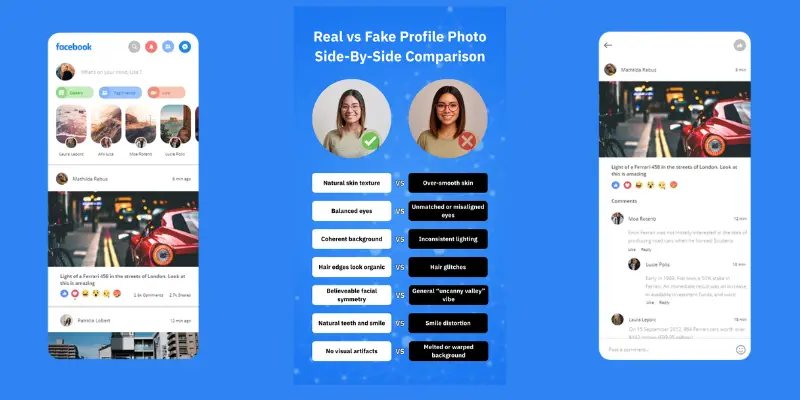
1. Features of a Fake Facebook Account
- It was often created recently, and old activity has not appeared.
- Profile photos may be copied from the internet, and the real owner remains unknown.
- There are very few posts or comments on the timeline.
- Friend lists have random people from different places.
- Messages may quickly ask for money or personal details about him or her.
2. Why Fake Facebook Accounts Are Created
- Fake accounts follow different purposes, and the main theme is hiding identity.
- Some accounts give scam links.
- Some accounts try to copy real users.
- Some accounts contact those people who accept unknown requests.
- Some accounts appear when someone wants privacy but uses the wrong method.
How to Find Out Who’s Behind a Fake Facebook Account
Many users search for ways to find out who is behind a fake Facebook account when a suspicious profile sends friend requests or messages. It is important to verify identity before trust has grown. There are simple check methods that allow users to review images, activities, and profile details. Each method provides helpful clues about the real person or indicates whether the identity was fake.
Below are easy methods. Each method explains what it is and how it helps.
- Reverse Image Search the Profile Photo
- Check Profile Timeline Activity
- Review the Friend List
- Check Username and Profile URL
- Search the Name on Other Social Platforms
- Ask for a Video Call
- Check Message Behavior
- Look at Account Creation Signals
- Use Email or Username Lookup Tools
- Report the Account for Verification
1. Reverse Image Search the Profile Photo
Reverse image search is a tool where users upload a picture to find where else that same image has appeared online. Fake accounts often use stolen photos because the real person has not created the fake profile. This method helps users determine who owns the image and how it was previously used.
How to check
- Save the profile picture.
- Upload the image to a reverse image search tool.
- Check where the same image has appeared online.
If the same photo has gone across many websites or other accounts, the profile image is likely fake.
2. Check Profile Timeline Activity
Timeline activity shows how a person uses the account. Real users share daily posts, photos, and comments. Fake accounts usually have very limited or new activity. This method helps users review when posts started and how people interact.
How to check
- Open the timeline.
- Review posts and reactions.
- Check when the posting activity began.
If posts have very low interaction or are only recent, the account was likely created for a short purpose.
3. Review the Friend List
Friend lists show social connections. Real accounts usually connect with school friends, family, or coworkers. Fake accounts often add random users. This method helps users check who connects with the profile.
How to check:
- Open the friend list here on the profile.
- Check locations and common friends.
If friends have no clear connection and come from many unrelated places, their identity may look suspicious.
4. Check Username and Profile URL
The username and profile link often show identity patterns. Fake accounts sometimes use random letters or numbers because their real names do not match the profile. This method helps users review how the account was created.
How to check:
- Look at the profile link.
- Check extra numbers or unusual spelling.
If the username has random patterns, the profile may not belong to a real person.
5. Search the Name on Other Social Platforms
Many real users create accounts on multiple platforms. Fake accounts usually exist on only one site. This method helps users check where the same identity has appeared.
How to check:
- Search the name on Instagram or LinkedIn.
- Compare photos and profile details.
If matching profiles have not appeared, identity proof becomes weak.
6. Ask for a Video Call
A video call helps confirm the identity of the person behind the profile. Real users usually agree because they are comfortable showing their identity. Fake users avoid live contact. This method helps users see who is speaking in real time.
How to check:
- Send a simple request for a short video call.
- Notice how the person replies.
Fake users delay replies, then stop responding. This behavior gives strong warning signs.
7. Check Message Behavior
Message patterns show user intent. Fake accounts often send fast messages when they want money or personal details. This method helps users review how the conversation has started.
How to check:
- Review the first messages.
- Check if requests for money or codes appeared.
If the account quickly asks for personal details about him or her, the scam theme becomes clear.
8. Look at Account Creation Signals
Account age shows profile history. Real accounts usually have older posts and gradual growth in activity. Fake accounts often have new timelines. This method helps users review when the account was created.
How to check:
- Scroll to the earliest posts.
- Check milestones or old activity.
If the activity has started recently and growth looks unnatural, the identity may be fake.
9. Use Email or Username Lookup Tools
Lookup tools search online databases using a username or an email address. These tools connect identities across platforms. This method helps users check where the same username has appeared.
How to check:
- Enter the username into the lookup tools.
- Review results.
If records have not appeared, the profile may not belong to a real identity.
10. Report the Account for Verification
Reporting helps platform security teams review suspicious activity. When users report fake profiles, verification processes start. This method helps protect those users who may receive similar messages.
How to check:
- Open the profile.
- Click the report option.
- Submit details.
Security review actions occur when rules are broken, and fake accounts may be removed.
Tools That Can Help Identify Fake Accounts
Many users search for tools to find out who is behind a fake profile on Facebook. It is easier to verify identity when smart online tools have been used. There are tools that let users upload images, search for usernames, or check email details. These tools provide helpful insights into how a profile image was used, where a username has appeared, and whether account data matches a real identity. Using the right tools has become an effective way to detect fake accounts.
Here are 5 Tools That Can Help Identify Fake Accounts
- Google Images: Reverse image search tool for checking profile photos.
- TinEye: Image tracking tool for finding where a photo has appeared online.
- Social Catfish: Identity lookup tool for checking usernames and emails.
- Spokeo: Online people search tool for reviewing public records.
- PimEyes: A face search tool for checking how images have matched across the internet.
Advantages and Disadvantages of How to Find Out Who’s Behind a Fake Facebook
Many users try to learn how to identify who is behind a fake profile on Facebook when suspicious activity arises. It is a helpful process for online safety, but there are some limits and risks. These advantages and disadvantages give a clear view of how identity checking works.
| 10 Advantages of Finding Who’s Behind a Fake Facebook |
|---|
|
| 10 Disadvantages of Finding Who’s Behind a Fake Facebook |
|---|
|
Conclusion
Finding how to find out who is behind a fake account on Facebook is an important step for online safety. There are simple methods where users check profile photos, activity, and friend connections. These steps provide clear indicators of whether an account is real or fake.
When users stay careful and review details before they trust, scams become easier to avoid. Safe habits have strong value because personal information stays protected. With the right tools and smart checking methods, social media use is safer and more reliable for everyone.
FAQs About How to Find Out Who’s Behind a Fake Facebook
Here are some questions about how to find out who is behind a fake Facebook account for students.
A user can review profile photos, timeline activity, and friend connections on Facebook. If the details do not match the real identity, the account may be fake.
Tracing depends on available data. There are cases where images, usernames, or activity give helpful clues, but some fake users hide details.
Reverse image search is one of the easiest methods because it shows where the profile photo has appeared online.
The user shall avoid sharing personal details and then report or block the account for safety.
Some users create fake accounts to hide their identity, send spam, or run scams by targeting people who accept unknown requests.
It is safer not to reply if the profile looks unusual or if the message behavior shows warning signs.
Removal time depends on review results. When rules have broken, action usually happens after the report check.
Yes, fake accounts often use images that the real owner did not create for their profile. Reverse image search helps verify how the photo was used online.