What Is End User Computing (EUC) – Meaning and Overview
Published: 4 Jan 2026
What is End User Computing, and why do people talk about it so often? Many users hear the term EUC but do not know its real meaning. Some think it is complex IT work, while others feel unsure about how it works. The idea is actually simple and easy to understand. Here, complete details about what End User Computing is will be explained.
What Is End User Computing?
End User Computing is the process where the final user uses computers, software, and devices to complete tasks. It means the user works directly with technology to create files, use applications, and manage daily work. It does not require coding or advanced technical skills. End user computing helps people use systems easily in offices, schools, and homes. It focuses on simple tools that allow users to work independently and efficiently.
How End User Computing Works?
End user computing works by giving users ready-to-use systems and tools. The user receives access to a device and approved software. The system connects the device to a secure network. There are tools that load applications and manage data. The user performs tasks like typing, saving, and sharing files. The system handles updates, controls, and support in the background. This process keeps work simple and smooth for the user.
Types of End User Computing
Types of End User Computing means how end users use technology and devices. Here, the types are explained so it is easy to understand. Each type depends on how the user works and which system they use.
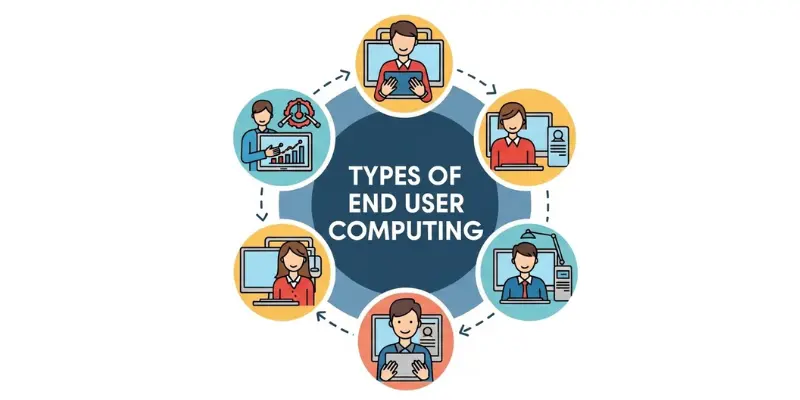
Here are 5 Types of End User Computing:
- Desktop Computing
- Mobile Computing
- Remote Computing Service
- Cloud Based End User Computing
- Virtual Desktop Computing
1. Desktop
In desktop computing, users work on fixed computers. It is common in offices and schools. Users open applications, create files, and complete tasks directly on the system.
2. Mobile
Mobile computing uses laptops, tablets, and smartphones. Users can work from anywhere. This type is best for flexible and remote work.
3. Remote Service
Remote computing service allows users to access systems and applications over the internet. Devices can be far away, but the work is completed smoothly.
4. Cloud Applications
Cloud-based EUC stores applications and data online. Users log in to the cloud to perform tasks. Examples include AWS EUC and VMware End User Computing.
5. Virtual Desktop
Virtual desktops give users a system that runs virtually, not directly on their device. This type is popular in large businesses where security and centralized control are important.
End User Computing Examples
End User Computing is used in many daily tasks where users directly interact with devices and software. It makes work easier and faster for people without technical skills.
Here are 7 Examples of End User Computing:
- Office staff using Excel to manage data.
- Students using learning apps on tablets.
- Employees sending emails and managing schedules.
- Shops tracking sales with point of sale software.
- People using cloud storage to save and share files.
- Workers using virtual desktops for remote access.
- Users creating presentations with office software.
What Are the Technologies Used in End User Computing
End User Computing uses several technologies that help users work easily and safely. These technologies let users access apps, manage devices, and handle data. Here are the main technologies with short introductions:
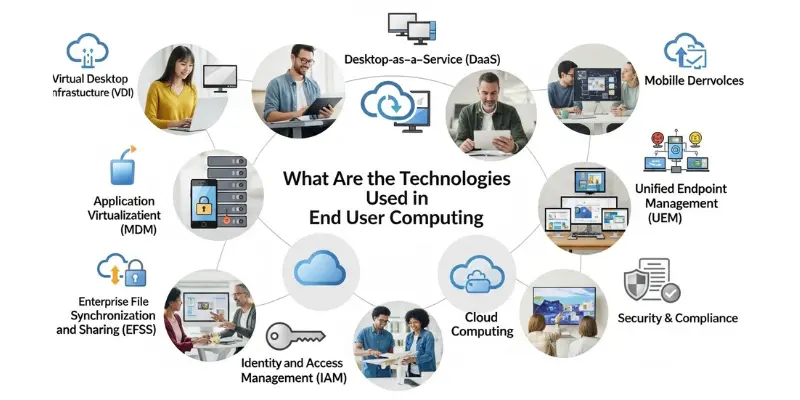
- Desktop Computing: This is a normal computer setup. Users open apps, type documents, and save files directly on the computer. It is common in offices and homes.
- Virtual Desktops: A virtual desktop is a desktop that runs on a remote server. Users can log in from anywhere and use it like a normal computer.
- Cloud Computing Platforms: Cloud systems like AWS EUC run applications online. Users can access files and apps without installing software on their devices.
- Application Computing: This technology provides software tools that help users complete tasks. It includes word processors, spreadsheets, and business apps.
- Remote Computing Services: These services allow users to access their work computers from other locations. It is useful for remote work or traveling employees.
- VMware End User Computing: VMware EUC is a platform that manages virtual desktops and apps for users. It makes work secure and organized.
- Security Tools: Security tools protect data and control who can access systems. They help prevent errors, hacking, and unauthorized access.
End User Computing Devices
End User Computing works through devices that let users access software, applications, and data easily. These devices are designed to make work simple, fast, and convenient for users. Here are some common 8 devices used in End User Computing:
- Desktop computers
- Laptops
- Tablets
- Mobile phones
- Thin clients
- Virtual desktop devices
- Workstations
- Cloud connected devices
End User Computing Tools
End User Computing works with simple tools that help users perform daily tasks quickly and efficiently. These tools make it easy for users to create, manage, and share data without technical knowledge. Here are some common 7 tools used in EUC:
- Office software like Word, Excel, PowerPoint.
- Email applications like Outlook, Gmail.
- Business dashboards.
- Spreadsheet applications like Excel EUC.
- Collaboration tools like Teams, Slack.
- Cloud applications like Google Drive, OneDrive.
- Remote desktop software.
End User Computing Services
End User Computing Services help users work easily with devices and software. They provide support, management, and tools so users can complete tasks without problems. These services make sure systems run smoothly and safely. Here are some common services:
- Device setup and configuration.
- Software installation and updates.
- User access management.
- Helpdesk support for troubleshooting.
- Remote computing support.
- Cloud service management.
- Security monitoring and control.
End User Computing Solutions
End User Computing solutions help users work smoothly by providing ready-to-use tools, software, and services. They make tasks easier, faster, and more secure for daily work. Here are some common solutions used in EUC:
- Secure access to devices and applications
- Cloud-based workspace solutions like AWS EUC
- Virtual desktops for remote work
- Device and application management tools
- End user support and helpdesk services
- Collaboration software for teams
- Automation tools for repetitive tasks
End User Computing Management
End User Computing Management helps organizations keep devices, software, and users organized and secure. It ensures systems work smoothly, updates are done on time, and users get proper support. Proper management makes end user computing more efficient and safe.
- Tracking all end user devices like desktops, laptops, and tablets
- Controlling user access and permissions
- Installing and updating software regularly
- Monitoring system performance and security
- Providing end user support and troubleshooting issues
- Enforcing end user computing policies and guidelines
- Managing cloud and remote computing access
End User Computing Engineer
An End User Computing Engineer is a professional who manages and supports systems used by end users. They make sure devices, software, and applications work smoothly. They help users fix problems, install updates, and maintain security. These engineers keep the work environment safe, fast, and easy for everyone.
Limitations of End User Computing
End User Computing is useful, but it has some limits. It depends on the user’s skills, so mistakes can happen. Sometimes devices or software can fail, causing delays. Security can be weak if rules are not followed. It may be hard to manage many users at the same time. Updates and maintenance need attention, or systems may stop working properly.
Difference Between EUC and End User Computing
Many people get confused between EUC and End User Computing. Actually, they are related, but there is a small difference. EUC is the short form, while End User Computing is the full term that explains the concept completely.
| Feature | EUC | End User Computing |
|---|---|---|
| Full Form | Abbreviation | Full term |
| Meaning | Short name for systems used by users | The complete concept of users working with computers, software, and devices |
| Usage | Often used in writing or reports | Used to explain the idea in detail |
| Audience | Technical documents or professionals | Beginners and general users |
| Context | Quick reference | Full explanation of computing for end users |
Advantages and Disadvantages of What is End User Computing
End User Computing helps people work directly with computers and software. It makes daily tasks easier and faster. At the same time, there are some challenges that users and organizations face.
| Advantages of End User Computing |
|---|
|
| Disadvantages of End User Computing |
|---|
|
Conclusion
End User Computing helps people use computers, software, and devices easily for daily tasks. It allows users to work directly without needing technical skills. With the right tools, devices, and support, users can complete work faster and more efficiently. While there are some risks and challenges, proper management and solutions make EUC safe and effective. Overall, it makes technology simple and useful for everyone.
FAQs About What is End User Computing
An end user is the person who uses a system, software, or device to do daily work.
Common devices include desktops, laptops, tablets, and mobile phones.
Examples include using Excel for data, email apps, business dashboards, and online learning apps.
Tools include office software, spreadsheet apps, email tools, and business applications that help users perform work easily.
An EUC engineer sets up systems, supports devices, fixes user issues, and manages software for end users.