What is Desktop Computer
Published: 1 Apr 2026
Walk into a school lab, office room, or small shop, and a desktop computer will often be sitting on a table. It may look simple from the outside, but it does many important jobs every day. From typing homework to managing office work, this machine helps in many ways. For readers who want to know what is desktop computer, this topic becomes easy to learn with simple words and clear examples.
What is Desktop Computer?
A desktop computer is a type of computer that stays on a desk or table. People use it for study, office work, games, internet use, and many daily tasks. It usually comes with separate parts like a monitor, keyboard, mouse, and CPU. This computer is made for one fixed place, so it is not easy to carry like a laptop. A desktop computer is known for good speed, a bigger screen, and easy use for home, school, and office work.
History of Desktop Computer
Desktop computers have changed a lot over time. In the past, computers were very large and only big companies or offices could use them. With time, technology improved, and computers became smaller, faster, and easier for normal people to use. Today, desktop computers are common in homes, schools, offices, and many workplaces because they help people do many tasks easily.
1. Early Computers
The first computers were very big and heavy. They needed a lot of space and power to work. These machines were not made for home use. Only scientists, large businesses, and government offices used them.
2. The Start of Personal Computers
In the 1970s and 1980s, computer companies started making smaller computers for personal use. This was an important step in computer history. People could now use computers at home and in small offices.
3. Desktop Computers Became Popular
In the 1980s and 1990s, desktop computers became very popular. Many schools, offices, and homes started using them. They helped people type documents, play games, save files, and learn new things.
4. Better Design and Faster Speed
As time passed, desktop computers became faster and more powerful. Companies improved their design, storage, and screen quality. New parts like better processors, more memory, and improved monitors made desktop computers more useful.
5. Desktop Computers in Modern Time
Today, desktop computers are used for study, office work, gaming, designing, and internet use. Modern desktop computers are smaller, smarter, and stronger than older models. They are still a popular choice for people who need good performance and easy use.
How Does a Desktop Computer Work?
A desktop computer works by taking information, processing it, and showing the result to the user. It follows a simple step-by-step system to complete tasks quickly and correctly.
- Takes input from the user: The user gives commands through the keyboard, mouse, or microphone.
- Sends data to the CPU: The computer sends the input to the CPU, which is the main working part of the system.
- Processes the information: The CPU reads the command and works on it very fast.
- Uses memory during work: RAM helps the computer hold temporary data while the task is running.
- Follows instructions from the operating system: The operating system helps the computer know what to do and how to do it.
- Gets help from software programs: The computer uses programs like browsers, games, or typing apps to do the required task.
- Shows the result on the screen: The monitor displays the output, such as text, images, videos, or web pages.
- Plays sound when needed: Speakers or headphones give audio output like music, videos, or alerts.
- Saves files in storage: The computer stores data, pictures, videos, and documents in the hard drive or SSD.
- Repeats the process again and again: The desktop computer keeps doing this process every time the user gives a new command.
Parts of Desktop Computer
A desktop computer has many important parts that work together to help the system run properly. Each part has its own job and helps the computer perform different tasks. Here are the complete parts of a desktop computer for beginners.
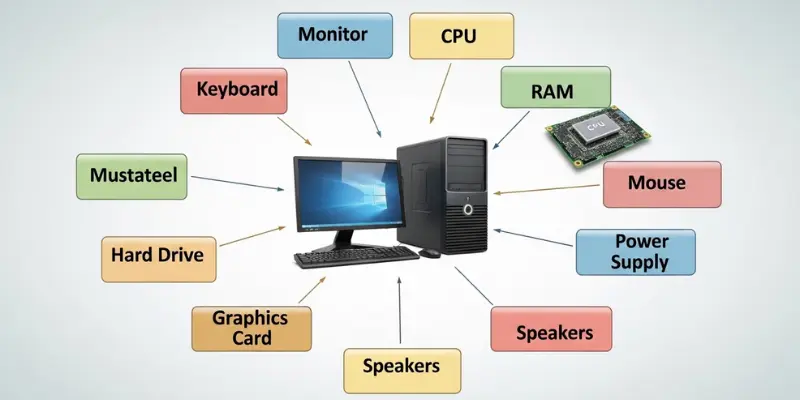
Here are 40 Parts of Desktop Computer included:
- Monitor
- CPU (Central Processing Unit)
- System Unit
- Motherboard
- Processor
- RAM (Random Access Memory)
- Hard Disk Drive (HDD)
- Solid State Drive (SSD)
- Power Supply Unit (PSU)
- Cooling Fan
- Heat Sink
- Graphics Card
- Sound Card
- Network Card
- Optical Drive
- Keyboard
- Mouse
- Speakers
- Headphones
- Microphone
- Webcam
- Printer
- Scanner
- UPS (Uninterruptible Power Supply)
- Cables and Wires
- USB Ports
- HDMI Port
- VGA Port
- Ethernet Port
- Audio Ports
- Power Button
- Computer Case
- Expansion Slots
- BIOS Chip
- CMOS Battery
- Wi-Fi Adapter
- Bluetooth Adapter
- Memory Card Reader
- External Hard Drive
- Pen Drive (USB Flash Drive)
Types of Desktop Computer
A desktop computer comes in different types for different needs. Each type has its own design, power, and purpose for home, office, study, gaming, or professional work. Here are 10 types of desktop computer included:
- Traditional Desktop Computer
- Tower Desktop Computer
- Mini Desktop Computer
- All-in-One Desktop Computer
- Gaming Desktop Computer
- Workstation Desktop Computer
- Business Desktop Computer
- Home Desktop Computer
- Student Desktop Computer
- Small Form Factor Desktop Computer
Uses of Desktop Computer
A desktop computer is useful for many tasks at home, school, office, and work. It helps people do work faster, learn new things, and enjoy entertainment. Here are 20 uses of desktop computer in daily life for beginner students to learn.
- Typing documents
- Browsing the internet
- Sending and receiving emails
- Watching videos and movies
- Listening to music
- Playing games
- Online learning and study
- Creating presentations
- Graphic designing
- Video editing
- Programming and coding
- Printing documents
- Managing office work
- Billing and accounting
- Storing files and data
- Video calls and meetings
- Research and homework
- Digital art and animation
- Social media use
- Online shopping
Features of a Desktop Computer
A desktop computer has many features that make it useful for home, school, office, and work. These features help it run fast, store data, and perform many tasks easily.
Here are 15 Features of Desktop Computer included:
- Large screen for easy viewing
- Fast processing speed
- High storage capacity
- Easy to upgrade parts
- Multiple ports for devices
- Comfortable keyboard and mouse use
- Strong performance for work and games
- Good sound output with speakers
- Can run multiple programs at once
- Durable and long-lasting
- Easy to repair and maintain
- Customizable design
- Supports high-quality graphics
- Stable internet connection options
- Works well for study, office, and entertainment
Desktop Computer vs Laptop Computer
A desktop computer and a laptop computer are both types of personal computers, but they are different in design, use, and features. Each has its own advantages and disadvantages for home, office, study, or gaming.
Difference Between Desktop Computer and Laptop Computer
| Feature | Desktop Computer | Laptop Computer |
|---|---|---|
| Portability | Stays in one place, not easy to carry | Small and easy to carry anywhere |
| Size | Larger, needs more space | Compact, fits in a bag |
| Screen | Usually larger | Usually smaller |
| Performance | Can be more powerful | Limited by size and battery |
| Power Supply | Needs constant electricity | Works on battery or electricity |
| Upgrade | Easy to upgrade parts | Harder to upgrade parts |
| Cost | Often cheaper for high performance | Usually more expensive for same power |
| Cooling | Better cooling with fans | Limited cooling due to small size |
| Keyboard and Mouse | Separate keyboard and mouse | Built-in keyboard and touchpad |
| Use | Best for home, office, gaming setup | Best for travel, school, remote work |
Advantages and Disadvantages of What is Desktop Computer
A desktop computer is a useful machine for work, study, gaming, and entertainment. It has many benefits but also some disadvantages. Here are explain pros and cons of desktop computer for students.
| 10 Advantages of Desktop Computer |
|---|
|
| 10 Disadvantages of Desktop Computer |
|---|
|
Conclusion
A desktop computer is a powerful and useful machine for home, school, office, and gaming. It has many important parts, features, and types that make work and study easier. While it is not portable like a laptop, it gives better performance, larger screens, and easy upgrades. Overall, a desktop computer remains a reliable choice for people who need a strong and stable computer for daily tasks.
FAQs About What is Desktop Computer
Many people have questions about desktop computers. These FAQs help beginners understand them easily and clearly. Here are common FAQs about desktop computer included:
The main parts include the monitor, which displays images and videos; the CPU or system unit, which processes all information; the keyboard and mouse for input; RAM and storage for memory; and other accessories like speakers, printers, and network cards. Each part works together to make the computer function smoothly.
Yes, a desktop computer is very helpful for students. It can be used for homework, research, online classes, typing assignments, and learning new skills. The large screen and fast performance make it easier for students to complete tasks quickly and efficiently.
Yes, desktop computers are ideal for gaming. Gaming desktops have strong processors, high-quality graphics cards, fast memory, and large storage. They can run modern games smoothly and provide a better experience compared to most laptops.
Offices prefer desktop computers because they are reliable, powerful, and easy to maintain. They can run office software, manage files, and handle multiple users’ work efficiently. Desktop computers also allow upgrades when more performance is needed.
A desktop computer usually lasts between five to ten years, depending on its use, maintenance, and quality of parts. Upgrading parts like RAM or storage can extend its lifespan.
Yes, most desktop computers can be upgraded. Users can add more RAM, increase storage, install a better graphics card, or even replace the processor. This makes desktops more flexible and long-lasting than laptops.
For performance, storage, and upgrade options, desktop computers are generally better. They are strong, stable, and suitable for heavy tasks like gaming, graphic design, and office work. Laptops are better for portability and mobility, but desktops remain the best choice for people who need power and reliability.