What is a CPU?
Published: 20 Jun 2025
The CPU controls every action in a computer. It reads instructions and performs tasks in seconds. It manages data and runs programs. Experts call it the Central Processing Unit. Many users hear this term but do not know its role. It explains what is a cpu in easy and clear words for beginner students.
What is a CPU?
The CPU means Central Processing Unit is the main part of computer that helps it do everything. It works like a smart helper that listens, thinks, and acts. If you open a game, type a word, or watch a video, the CPU makes it all happen. Without the CPU, the computer cannot do anything. It is small, but it is very powerful.
History of CPU
The CPU journey started with room-sized machines. The invention of the Intel 4004 changed everything in 1971. Competition between Intel and AMD pushed rapid growth. Software demands forced constant upgrades. Multi-core design solved heat issues. Modern CPUs now power computers, laptops, and smartphones with high efficiency.
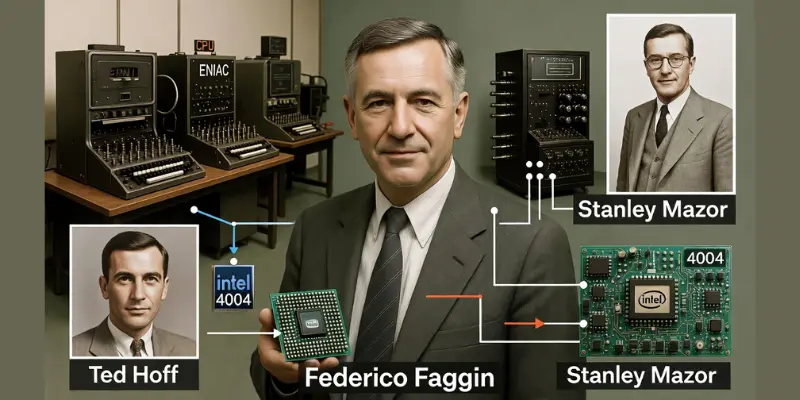
Engieer Invented the CPU?
The first commercial CPU was created by a team of engineers at Intel in 1971. The processor name was Intel 4004. The main engineer behind this invention was Federico Faggin. He led the design and development of the chip. Two more important engineers worked on the project:
- Ted Hoff: He created the main idea and architecture.
- Stanley Mazor: He helped design the logic and instructions.
These engineers built the first single-chip microprocessor. Before this invention, computers used many separate parts. The Intel 4004 placed processing power into one small chip. This invention started the modern CPU era. Many experts credit Federico Faggin as the key inventor because he turned the idea into a working silicon chip.
Early Idea of Computer Processing
The idea of a processor started before the modern CPU chip. Early computers like ENIAC used large vacuum tubes. These machines filled entire rooms. Engineers built them in the 1940s. Scientists wanted faster and smaller systems. Vacuum tubes consumed high power and produced heavy heat. Engineers searched for a better solution.
The First Microprocessor
The first real CPU on a single chip appeared in 1971. Intel introduced the Intel 4004. Engineer Federico Faggin led the design team. This small chip changed computer history. It combined processing power into one tiny unit. Before this invention, engineers placed many separate parts on large boards. The 4004 made computers smaller and more efficient.
Rapid Growth in the 1970s and 1980s
After the Intel 4004, companies released stronger processors. Intel launched the 8008 and later the 8086. These chips powered early personal computers. Brands improved clock speed and performance. Engineers added better instruction handling. Each new version processed data faster. Users demanded better performance for business and home tasks.
Competition and Innovation
In the 1980s and 1990s, competition increased. AMD entered the market and developed its own processors. Both Intel and AMD focused on speed, power, and efficiency. Engineers improved transistor design. They reduced chip size. Smaller transistors allowed more power inside one chip. This change improved computer performance.
Why Upgrades Became Necessary
Software grew more complex. Graphics improved. Games required more power. Businesses used heavy applications. Users wanted faster systems. Old CPUs struggled with modern programs. Manufacturers upgraded processors to meet new demands. Higher clock speeds and better architecture solved many problems.
The Rise of Multi Core Processors
Around the mid-2000s, engineers faced a heat problem. Increasing speed alone caused overheating. Designers introduced multi-core processors. A multi-core CPU includes two or more cores inside one chip. Each core handles tasks separately. This design improved performance without extreme heat. Multi-core processors changed modern computing.
Modern CPU Improvements
Modern CPUs include advanced features:
- Higher clock speeds
- Multiple cores
- Better cache memory
- Improved energy efficiency
- Built-in graphics in some models
Manufacturers now focus on smart architecture. They improve power management. They support artificial intelligence tasks. Each generation becomes smaller and stronger.
Continuous Evolution
CPU development continues today. Engineers use nanometer technology to shrink transistor size. Smaller design increases efficiency. Companies upgrade architecture to support modern software and cloud systems. The need for speed, multitasking, and energy savings drives every upgrade.
Parts of CPU
A CPU contains several important parts. Each part performs a specific task. These parts work together and help the computer run programs. The control unit manages instructions. The arithmetic logic unit solves calculations. Small storage areas hold temporary data. Below the main 10 parts of CPU for beginner students.
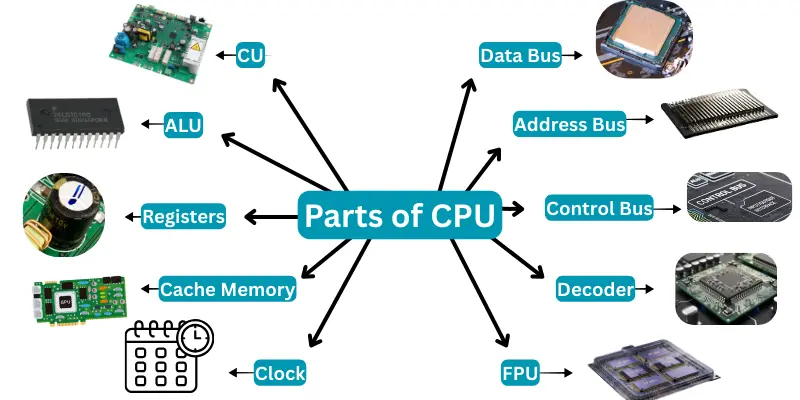
Here are the most common 10 parts of a CPU, which include:
- Control Unit (CU)
- Arithmetic Logic Unit (ALU)
- Registers
- Cache Memory
- Clock
- Data Bus
- Address Bus
- Control Bus
- Instruction Decoder
- Floating Point Unit (FPU)
Types of CPU
A CPU can be different in how it works and how many tasks it can handle at the same time. Each type has its own speed and performance. People choose CPUs based on their needs and the kind of computer they use. Here are 10 types of CPU for students.
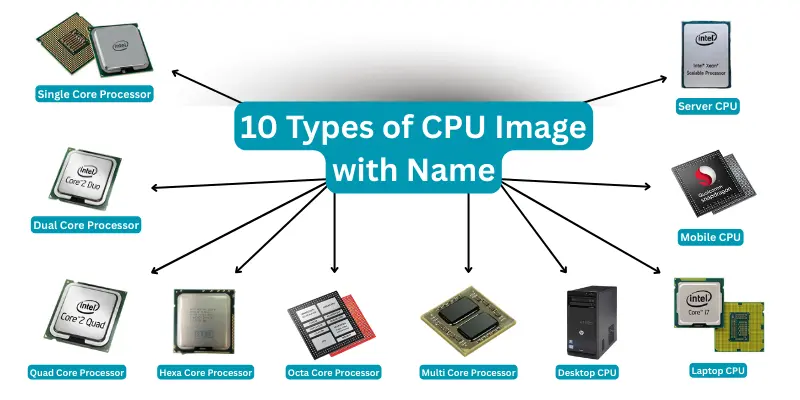
Here are 10 types of a CPU Include.
- Single Core Processor
- Dual Core Processor
- Quad Core Processor
- Hexa Core Processor
- Octa Core Processor
- Multi Core Processor
- Desktop CPU
- Laptop CPU
- Mobile CPU
- Server CPU
Functions of a CPU
The CPU controls all tasks inside a computer. It reads instructions, processes data, and sends results. Every program and application depends on the CPU to work. It is the main part that keeps the computer running smoothly. Here are functions of CPU explain in details for students.
- Fetches instructions from memory
- Decodes instructions to understand them
- Executes instructions and performs calculations
- Stores results back in memory
- Controls other hardware components
- Manages data flow between memory and devices
- Handles logic and arithmetic operations
- Coordinates tasks for smooth performance
How Works CPU?
The CPU works like a smart helper inside the computer. It follows simple steps to do any task quickly and correctly. Every time you use a computer, the CPU is busy doing its job.
- It receives the data (input): The CPU gets the data or instructions from the keyboard, mouse, or another part of the computer.
- It works on the data (process): The CPU thinks about the data and solves problems or makes decisions.
- It gives the result (output): After working, the CPU sends the answer to the screen, printer, or another device.
Features of CPU
There are many features of CPU that make it important for computers. It is fast, controls tasks, and handles instructions. The CPU works efficiently to process data and manage programs. Each feature helps the computer run smoothly and perform better.
Here are 10 features of CPU include.
- High processing speed
- Ability to execute instructions
- Multi-core support
- Cache memory for faster access
- Handles arithmetic and logic operations
- Controls other hardware components
- Manages data flow
- Supports multitasking
- Low power consumption in modern CPUs
- Compatibility with various software and devices
Advantages and Disadvantages of CPU
The CPU helps the computer work fast and do many things at once. But sometimes, it can get slow or use too much power. Here are complete explanations about pros and cons of CPU for students.
| 10 Advantages of CPU |
|---|
|
| 10 Disadvantages of CPU |
|---|
|
FAQs about What is a CPU?
Many people have questions about the what is a CPU because it is an important part of the computer. Here are some easy answers to common questions that can help you understand what is a CPU and how the CPU works.
You can tell if the CPU is working when your computer turns on and programs run smoothly. If the computer is very slow or stops working, the CPU might have a problem.
You can check CPU speed by looking at your computer’s system information. It shows the speed in GHz (gigahertz). Higher speed means faster CPU.
Cleaning a CPU means removing dust from the fan and heat sink carefully. Use a soft brush or air blower to clean it without touching the CPU chip directly.
To keep the CPU cool, computers use fans and heat sinks. You should keep your computer in a cool place and clean the fans often.
Upgrading a CPU means replacing the old CPU with a better one. This needs opening the computer and is usually done by an expert.
The best CPU depends on what you want to do. For simple work, a small CPU is enough. For games and videos, a faster CPU with more cores is better.
To protect your CPU, avoid overheating by keeping it clean and cool. Also, use a good power supply and do not open your computer often without help.
Conclusion
The CPU is the key part that makes the computer work. It helps the computer think and do all the jobs we ask it to do. Without the CPU, the computer cannot work. Learning about what is a CPU helps us understand how computers do their work every day.