What is Scanner in Computer
Published: 9 Dec 2025
Did you know that the first computer scanner was invented in the 1950s to digitize images for research purposes? A scanner in a computer is a device that converts physical documents or photos into digital form, allowing you to edit, store, and share them easily.
Here are complete details about what is scanner in computer, the types of scanners, the parts of a scanner, and the advantages and disadvantages of scanners.
What Is Scanner in Computer?
A scanner is a computer input device that scans paper and changes it into a digital image. People call it a computer scanner, digital scanner, document scanner, or image scanner are the same.
History of Scanner
The history of the scanner is a long journey that shows how technology has changed the way we save and share information. It is a story that begins many years ago, when computers were still new, and people wanted a way to copy paper into digital form.
Back in 1957, the first image scanner was created by a man named Russell A. Kirsch. He worked at the National Bureau of Standards, where he built a device that scanned a small picture of his son. This moment has become famous because it opened the door for all the scanners we use today.
In the 1960s and 1970s, there are many improvements in scanner technology. These early scanners were large machines that worked slowly, but they are important because they showed how powerful digital copying could be.
Engineers worked hard to see how scanners could capture clearer images, and from then the technology kept growing.
By the 1980s, flatbed scanners arrived, and here the real change began. These scanners allowed people to place a page on a glass surface and copy it quickly. Students, teachers, offices, and artists used them because they offered a simple and fast way to turn paper into computer files. Those flatbed scanners soon became the theme of modern scanning.
In the 1990s and 2000s, scanning technology went even further. Color scanning became common, other image formats were added, and the resolution became sharper. Companies introduced portable scanners, where anyone could carry a small device for instant scanning. This is the time when scanners became part of daily life.
Today, scanners are fast, smart, and used everywhere in homes, schools, hospitals, and companies. If we look at the full history, we can see who worked hard and how each idea helped scanners become better. The history of scanners shows how humans have gone from simple machines to advanced digital tools that save photos, documents, and memories forever.
How Does a Scanner Work?
It is amazing to see how a scanner turns a paper picture into a digital image. There are small lights, sensors, and moving parts inside the scanner that work together to copy the details. They are placed in a straight line so every part of the page gets scanned clearly.
Then the scanner shines a bright light on the document. Other machines may work differently, as scanners use a simple light-and-sensor method. The document stays in one place, where the light moves slowly from one side to the other. The scanner captures tiny dots, and each dot becomes part of the final image.
When the light hits the page, the sensor reads how bright or dark each spot is. The sensor acts like a helper who collects all the details. This is how the computer receives a clean picture. Here, the scanner sends all the information to the computer in just a few seconds.
If the page is colorful, the scanner reads each color separately. The software shall join the colors together and give a neat digital copy. By the time the page is fully scanned, the light has gone from top to bottom. The machine has already saved every small detail.
Sometimes a scanner can help her save artwork, help him protect documents, and help families have safe copies of papers. People use scanners to protect those important files they never want to lose. The theme of scanning stays simple: shine light, read details, and create a digital copy every time.
Types of Scanners
There are many types of scanners, and each type has a special purpose. Here is a list of the main types of scanners that people commonly use today.
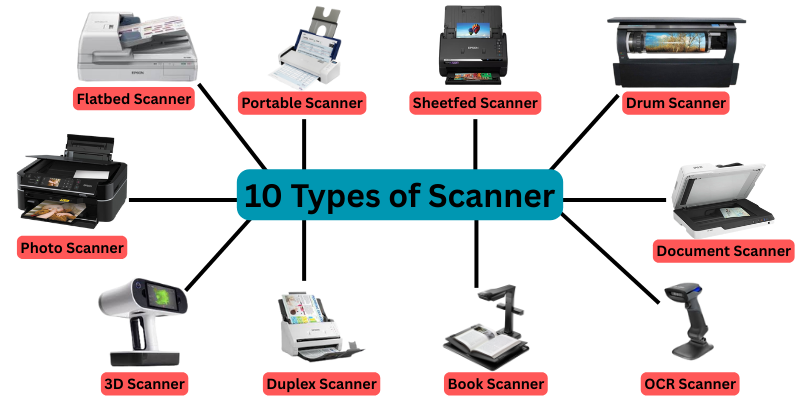
20 Types of Scanners in a Computer are here
- Flatbed Scanner
- Portable Scanner
- Sheetfed Scanner
- Drum Scanner
- Photo Scanner
- Large Format Scanner
- 3D Scanner
- Duplex Scanner
- Book Scanner
- Cheque Scanner
- OCR Scanner
- Overhead Scanner
- Personal Scanner
- Production Scanner
- Barcode Scanner
- Document Scanner
- Barcode Reader
- Canon Scanners
- Film Scanner
- Slide Scanner
Parts of a Scanner
A scanner is made of different parts that work together to capture images or documents and convert them into digital files. Each part has a special role to make scanning accurate and easy. Here are explain 10 parts of scanner for students.
- Glass Plate
- Light Source
- Mirror
- Lens
- Image Sensor
- Stepper Motor
- ADF (Automatic Document Feeder)
- Control Panel
- USB/Interface Port
- Power Supply
What is Scanner Functions?
A scanner has many uses and functions. If someone knows these functions, they can use a scanner properly at home, school, or the office. Those who work with computers daily will find scanners very helpful.
Here, we will explain the main scanner functions so anyone can understand how a scanner works and why it is important.
Here are some scanner functions, including:
- Converts physical documents into digital format
- Captures images and photos for computer use
- Helps store and organize documents digitally
- Enables editing of scanned text and images
- Allows sharing documents via email or cloud
- Supports Optical Character Recognition (OCR) for text
- Makes backup copies of important papers
Resolution of Scanner
The resolution of a scanner tells us how clear and detailed a scanned image will be. It is measured in dots per inch (DPI).
- Higher DPI = clearer image: The more dots per inch, the sharper and more detailed the scanned picture or document will be.
- Lower DPI = smaller file: A lower DPI creates a less detailed image but takes up less space on your computer.
Example:
- 300 DPI is good for normal documents.
- 600 DPI or more is used for high-quality photos.
10 Uses of Scanner in a Computer
Scanners are amazing tools that help people copy paper documents, photos, and drawings into computers. It is easy to use, and there are many types of scanners available today. They are helpful in homes, schools, banks, and offices. Then we shall see the main uses of scanners.
Here are 10 important uses of scanner:
- Scan papers to save them on your computer.
- Turn old photos into digital images.
- Make changes to scanned files using a computer.
- Send scanned files by email or upload online.
- Keep digital copies to prevent loss or damage.
- Digitize pages for easier reading or studying.
- Scan a document and print it multiple times.
- Convert scanned text into editable text.
- Preserve art or technical drawings digitally.
- Keep scanned copies as a backup for safety.
Limitations of Scanner
Although a scanner is a very useful computer device, it is not perfect. There are some limitations that users should know before using it. They are important to understand because they affect how someone scans documents, photos, or other materials.
- Can be slow: Scanning large documents or high-resolution images takes time.
- Cannot scan everything: Some objects, like thick books or 3D items, are difficult to scan.
- File size can be large: High-resolution scans create big files that take more storage space.
- Requires maintenance: Scanners need cleaning and care to work properly.
- Dependent on computer: Scanned files need a computer to view, edit, or save.
Manufacturers of Scanners
There are many companies that make scanners for computers. These manufacturers provide computer scanners, digital scanners, document scanners, and image scanners for schools, offices, banks, and homes. They are known for quality, speed, and reliability. Here are some famous scanner manufacturers who have made scanners popular worldwide.
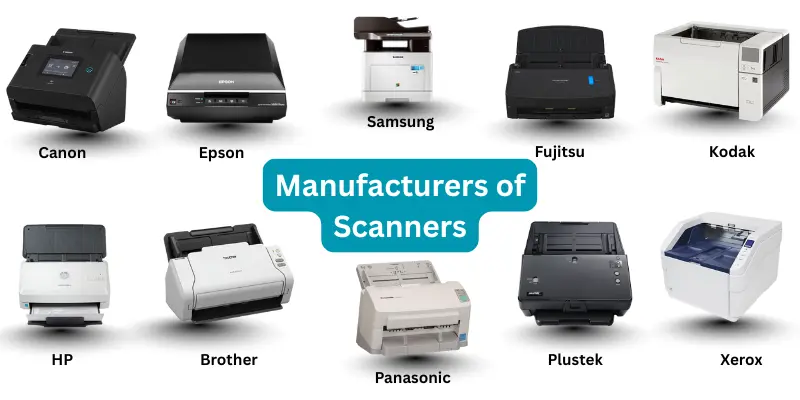
1. Canon
Canon is one of the leading brands in scanners. It has flatbed scanners, sheetfed scanners, and photo scanners. They are used for home, office, and photography purposes. Canon scanners are famous for clear images and high scanning resolution.
2. Epson
Epson is a big name in computer scanners. They are best known for flatbed scanners and portable scanners. Epson scanners give high-quality color and fast scanning speed. Many schools and offices choose Epson because it is reliable.
3. HP (Hewlett-Packard)
HP makes scanners that are simple and easy to use. HP scanners include all-in-one devices with printer and scanner combined. They are great for office work, school notes, and scanning documents. HP has models that scan photos, ID cards, and receipts.
4. Brother
Brother scanners are used in homes and small offices. It is known for sheetfed scanners and duplex scanners. They are efficient, and their scanners save time when scanning multiple pages. Brother also has other scanner types for businesses.
5. Fujitsu
Fujitsu scanners are high-quality machines for production scanners. They are used in banks, libraries, and offices. Fujitsu scanners can scan many documents quickly. They have special features like OCR and duplex scanning.
6. Plustek
Plustek manufactures photo scanners, film scanners, and document scanners. It is famous for scanning old photos and slides with great detail. Plustek scanners give high-resolution images for photography and archives.
7. Kodak
Kodak scanners focus on photos and documents. They are widely used in photography studios. Kodak scanners have advanced color scanning and other features for professional use.
8. Xerox
Xerox scanners are mainly for office and production use. It is known for large-format scanners and document scanners. They are fast and reliable when scanning hundreds of papers every day.
9. Samsung
Samsung makes digital scanners for offices and small businesses. They have portable scanners and sheetfed scanners. Samsung scanners give clear scanned images and are easy to use with computers.
10. Panasonic
Panasonic scanners are used for business and industrial purposes. They are known for high-speed scanning and durability. It is popular where large volumes of documents need scanning.
Difference Between Printer and Scanner
A printer and a scanner are both important computer devices, but they do different jobs. It is easy to confuse them if someone is new to computers. Here is a simple explanation with a table to show the main differences.
| Feature | Scanner | Printer |
|---|---|---|
| Device Type | A scanner is an input device. It sends documents, images, or drawings into the computer. | A printer is an output device. It prints digital files onto paper. |
| Main Function | What does a scanner do? It copies paper and converts it into a digital image. | What does a printer do? It takes a digital file and prints it as a paper copy. |
| Data Direction | Data flows into the computer. | Data flows out of the computer. |
| Examples | Flatbed scanner, handheld scanner, barcode scanner, drum scanner. | Inkjet printer, laser printer, photo printer. |
| Use Cases | Saving documents, scanning photos, reading barcodes, and creating digital books. | Printing homework, office documents, photos, and forms. |
| Resolution | High-resolution scanning for images and text. | Print resolution depends on printer type: color or black & white. |
| Other Features | Some scanners have OCR to convert scanned text into editable files. | Some printers can copy, scan, or fax, but printing is their main function. |
Advantages and Disadvantages of Scanner
Here we will explain the advantages and disadvantages of scanners in simple words.
| 10 Advantages of Scanner |
|---|
|
| 8 Disadvantages of Scanner |
|---|
|
Conclusion
Scanners are very helpful in turning paper into digital files. It is a tool that saves time, protects important documents, and helps people share files. Then, they also have some limits like cost, size, and maintenance. Overall, scanners are useful devices in computers for schools, offices, and personal use.
FAQs About What Is Scanner in Computer
It is easy to see why scanners are very helpful. They save documents in digital form, protect papers from being lost, allow fast sharing of files online, and make copies of important images and text. Other advantages include high-quality scans, support for multiple file formats, and easy integration with computers.
Scanners are used in schools, offices, banks, hospitals, and homes. They are helpful for saving important documents, sharing pictures, scanning artwork, reading barcodes, storing receipts, creating digital books, passport and ID scanning, and even medical and dental use.
There are other creative ways people use scanners for design, photography, and research.
Yes, scanners can handle different paper sizes. Flatbed scanners and sheetfed scanners allow scanning of small papers like receipts or large papers like maps and posters. There are also large-format scanners specifically for very big documents.
It is true that many scanners can produce high-resolution scans. They use sensors that capture every detail of the paper. The resolution is usually measured in DPI (dots per inch), and higher DPI gives sharper images. Photo scanners, drum scanners, and film scanners are especially good at high-resolution scanning.
Yes, scanners with OCR (Optical Character Recognition) can recognize text in scanned documents. This means the scanned paper can be converted into editable text files. OCR scanners are very helpful for offices, students, and professionals who need to work with documents digitally.
Yes, you can use a scanner with a computer. Most scanners connect via USB, Wi-Fi, or Bluetooth. They are recognized as input devices, and your computer can open the scanned images or documents using scanning software. There are other devices, like all-in-one printers that also include scanners.
Yes, there are software applications that come with scanners or can be downloaded separately. They help control the scanner, set resolution, select file format, and edit scanned images. Examples include Canon software, Epson Scan, and third-party scanning tools. They also support batch scanning and OCR.
Yes, scanners can scan multiple pages into a single file. This is common with sheetfed scanners or duplex scanners. After scanning, the software combines the pages into one PDF or other document format. There are other options like scanning pages one by one and merging them manually.
Yes, there are mobile apps for scanning documents. Apps like Adobe Scan, CamScanner, and Microsoft Lens allow scanning directly with a smartphone camera. They are easy to use and can create PDFs or images instantly. Some apps also include OCR to recognize text.
Yes, scanners can be used for security. They are often part of ID verification, passport scanning, and access control systems. Banks, airports, and offices use scanners to check documents and detect fraudulent papers. There are other advanced scanners that read barcodes and QR codes for security.
Yes, scanners can be integrated with other devices like computers, printers, servers, and mobile apps. They can work with document management systems, cloud storage, and office networks. This makes scanning faster and sharing easier. There are other ways to integrate scanners for automated workflows.
Yes, scanners require some maintenance. They need clean glass surfaces, dust-free sensors, and software updates. If the rollers or motors get dirty, scanning may not be smooth. Proper maintenance helps keep the scanner working longer.
There are other simple steps like covering the scanner when not in use and checking cables regularly.