What is Speaker in Computer – An Introduction
Published: 26 Jan 2026
Have you ever asked, “What is speaker in computer and how does it work?” Many people get confused between input and output devices. Computer speakers are not for typing or touching they are only for sound. They let you hear music, notifications, and all other computer sounds.
What is Speaker in Computer?
A computer speaker is a hardware device that changes digital signals into sound. They allow you to hear music, notifications, videos, games, and other audio. In simple words, speakers are what make a computer talk. Speakers are not input devices. They only give sound to users, which is why they are called output devices.
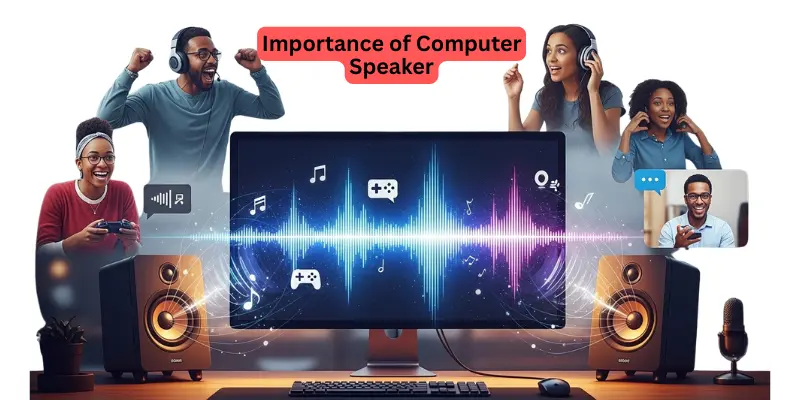
Importance of Speakers in Computer
Speakers in a computer are very important because they help us hear sound clearly. They are computer output devices that make music, videos, alerts, and games enjoyable. Without speakers in a computer, we would not be able to listen to sounds or notifications from our system. They are simple to use and improve the overall computer experience.
Parts of a Speaker
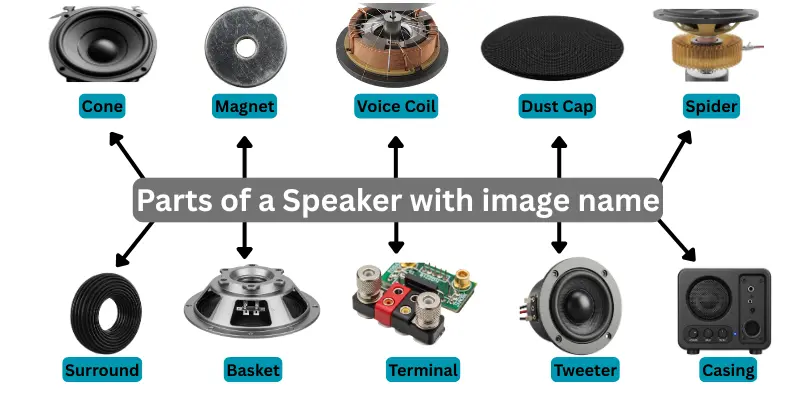
A computer speaker has different parts that work together to create clear and loud sound. Each part has a special function to make the sound better. Here are the 10 parts of a computer speaker explained in complete detail for beginners.
- Cone
- Magnet
- Voice Coil
- Dust Cap
- Spider
- Surround
- Basket
- Terminal
- Tweeter
- Casing
1. Cone
The cone is the main part of a speaker. It moves back and forth to produce sound waves. The cone is usually made of paper, plastic, or metal. The size and material of the cone affect how loud and clear the sound is.
2. Magnet
The magnet works with the voice coil to move the cone. It creates a magnetic field that helps the cone vibrate. Stronger magnets produce louder and better sound.
3. Voice Coil
The voice coil is a wire coil inside the speaker. It receives electrical signals from the computer. When electricity passes through, it moves the cone with the magnet to create sound. The voice coil is very important in every computer speaker.
4. Dust Cap
The dust cap covers the center of the cone to prevent dust and dirt from entering. It also helps in keeping the sound smooth. Small dust caps are found in both internal and external speakers.
5. Spider
The spider is a flexible ring under the cone. It holds the voice coil in place and allows it to move freely. The spider helps the cone move without getting stuck, giving clear sound.
6. Surround
The surround is the soft edge around the cone. It helps the cone move back and forth and keeps the sound smooth. Without the surround, the cone could not produce proper sound.
7. Basket
The basket is the frame of the speaker. It holds all the parts together like the cone, magnet, and voice coil. Baskets are usually made of metal or strong plastic.
8. Terminal
The terminal is where you connect wires to the speaker. Terminals link the speaker to your computer or audio device. Proper connection is important for clear sound.
9. Tweeter
Some speakers have a tweeter, a small part that produces high-frequency sounds like bird chirps or cymbals. Tweeters make music and games more detailed and enjoyable.
10. Casing
The casing or enclosure protects all the internal parts of the speaker. It also helps the sound spread better. External speakers usually have larger casings for louder sound, while laptop speakers have small enclosures.
How a Computer Speaker Works
A speaker plays sound from your computer. Here’s an easy way to understand how it works:
- The computer creates sound data, like music, voice, or game sounds.
- This sound is sent to the sound card.
- The sound card changes the digital signals into analog signals.
- The computer sends these signals to the speaker.
- The speaker uses power to make the sound louder.
- The speaker cone vibrates to produce sound waves.
- These sound waves travel through the air.
- We hear the sound clearly through the speaker.
- External or internal speakers work in the same way.
- Speakers make the computer experience fun and interactive.
How to Connect Speakers to a Computer
A computer speaker lets you hear music, videos, games, and alerts. To enjoy clear sound, you need to connect your speakers correctly. Here’s a simple guide to do it.
1. Using a 3.5mm Audio Jack
Most computers and laptops have a 3.5mm headphone port. To connect the speaker, use a 3.5mm audio jack. Take the speaker cable with a 3.5mm plug and insert it into the audio-out port of your computer. Turn on the speakers and adjust the volume. This method works for both internal and external speakers.
2. Using USB Connection
Some speakers connect via USB. To connect the speaker using USB, plug the USB cable from the speaker into a USB port on your computer. Your computer may automatically install the required drivers. Turn on the speaker and check the sound. USB speakers are usually powered directly by the computer.
3. Using Bluetooth (Wireless Speakers)
Modern computers and laptops support Bluetooth speakers. To connect a Bluetooth speaker, turn it on and open the Bluetooth settings on your computer. Select your speaker from the list of devices, pair it, and check the sound. Wireless speakers are portable and easy to use, with no cables needed.
4. Check Speaker Settings
After connecting, make sure the speaker is powered on. The computer volume is up. The correct audio output device is selected in your computer’s settings.
Types of Computer Speakers
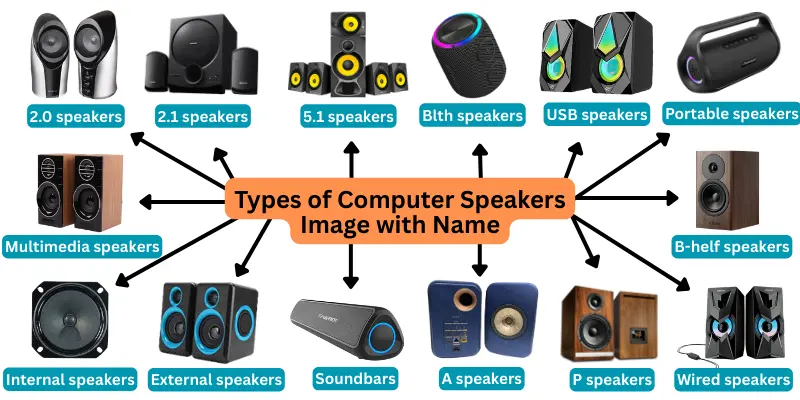
Computers need speakers to produce sound, and there are many types of computer speakers. Some are small and built inside laptops, while others are large and give better sound for movies, games, or music. Here are some common types of computer speakers, explained in detail for beginners.
- 2.0 speakers
- 2.1 speakers
- 5.1 speakers
- Bluetooth speakers
- USB speakers
- Portable speakers
- Multimedia speakers
- Bookshelf speakers
- Internal speakers
- External speakers
- Soundbars
- RGB speakers
- Active speakers
- Passive speakers
- Wired speakers
- Subwoofers
- Dynamic Speakers
- Electrostatic Speakers
1. 2.0 Speakers
2.0 speakers have two channels: left and right. They are simple and ideal for basic computer use. These speakers are perfect for listening to music, watching videos, or doing online classes.
2. 2.1 Speakers
2.1 speakers include two main speakers and one subwoofer for extra bass. They provide louder and deeper sound than 2.0 speakers. These are great for gaming, movies, and music.
3. 5.1 Speakers
5.1 speakers are surround sound systems with five speakers and one subwoofer. They create immersive sound for gaming or movies. You feel the sound coming from all directions.
4. Bluetooth Speakers
Bluetooth speakers connect wirelessly to a computer. They give freedom to place them anywhere in the room. These are perfect for streaming music, online meetings, or presentations.
5. USB Speakers
USB speakers connect directly to the computer via a USB port. They are easy to use and usually work without extra power. They are great for desktops and laptops.
6. Portable Speakers
Portable speakers are small and battery-powered. You can carry them anywhere. They are perfect for travel, small rooms, or casual listening.
7. Multimedia Speakers
Multimedia speakers are designed for daily computer use. They combine good sound with a compact design. Perfect for videos, music, and video calls.
8. Bookshelf Speakers
Bookshelf speakers are medium-sized speakers that sit on a desk or shelf. They provide clear sound for music, movies, and gaming.
9. Internal Speakers
Internal speakers are built into laptops, monitors, or all-in-one PCs. They are small but useful for basic alerts, notifications, or videos.
10. External Speakers
External speakers are separate and connected via USB, audio jack, or Bluetooth. They give better sound than internal speakers and are ideal for movies, music, or games.
11. Soundbars
Soundbars are long speakers that improve TV or computer sound. They give clear, loud sound and are good for watching movies or online classes.
12. RGB Speakers
RGB speakers have colorful lights that change while playing music. They are popular for gaming setups and streaming rooms.
13. Active Speakers
Active speakers have a built-in amplifier. This means they do not need extra devices to make sound louder. They are simple to use and give clear sound.
14. Passive Speakers
Passive speakers need an external amplifier to work. They are mostly used in professional sound systems. They provide high-quality audio when paired with the right equipment.
15. Wired Speakers
Wired speakers connect using cables like 3.5mm jack or USB. They provide stable sound without interference. They are easy to use with desktops and laptops.
16. Subwoofers
Subwoofers are speakers that produce very low frequency sound, usually between 20 to 200 Hz. They are often used with computers for games or movies to give deep bass effects. Subwoofers can be placed in different directions to improve sound quality.
17. Dynamic Speakers
Dynamic speakers are very common. They often include one or more woofer drivers for low sounds and tweeter drivers for high sounds. They are widely used for professional audio or gaming because they provide a balanced sound experience.
18. Electrostatic Speakers
Electrostatic speakers are used for very clear and detailed sound. They usually need external power and are best for high-frequency sounds. These speakers are great for users who want premium sound quality from their computers.
Functions of Computer Speakers
Computer speakers are devices that produce sound from your computer. They are output devices, which means they give sound instead of taking it. Speakers in a computer let you listen to music, watch videos, play games, and hear alerts or notifications. Here are some 10 functions of computer speakers included.
- Playing Music
- Watching Videos and Movies
- Gaming Sound Effects
- Alerts and Notifications
- Communication
- PC Audio Output for Applications
- Voice Commands and Feedback
- Loudspeakers for Presentations
- Notification Sounds for Games and Apps
- Enhanced Multimedia Experience
Uses of Speakers in Computer
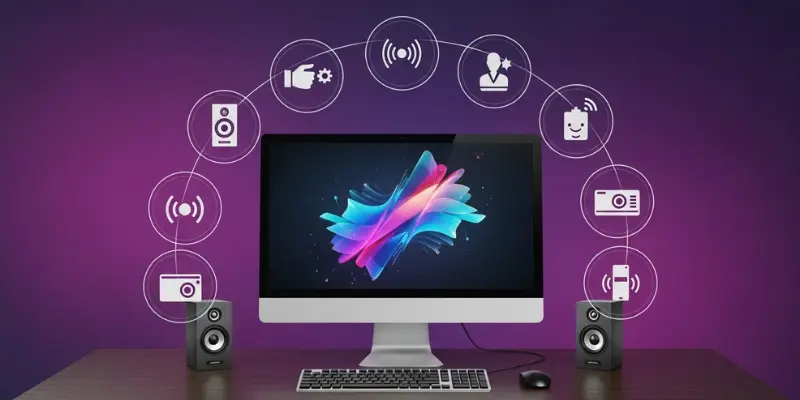
Speakers in a computer are devices that allow us to hear sounds clearly. They make it easy to enjoy music, watch videos, play games, and listen to important alerts. Computers use speakers in many ways every day to improve our experience.
- Listening to Music: Speakers play songs loudly and clearly, giving a better music experience.
- Watching Movies: They make movies sound realistic and enjoyable, so every scene comes alive.
- Playing Games: Speakers provide exciting sound effects and background music during games, making gaming more fun.
- Video Calls: With speakers, we can hear friends, family, and colleagues clearly during video calls.
- Online Classes: Speakers help students listen to teachers and understand lessons better.
- Alerts and Notifications: They produce important sounds to warn or notify us about system updates, messages, or errors.
- Presentations: Speakers make your voice or presentation audio loud and clear for everyone to hear.
- Watching Tutorials: They help learners follow tutorials easily by providing clear audio instructions.
- Voice Recording: Speakers allow you to listen to your own recorded voice or playback recordings effectively.
- Relaxation: Speakers can play calm music or soothing sounds to help you relax after work or study.
Advantages and Disadvantages of Speakers in Computer
Speakers allow us to hear sound from the computer, but like any device, they have both advantages and disadvantages.
| 10 Advantages of Computer Speaker |
|---|
|
| 10 Disadvantages of Computer Speakers |
|---|
|
Conclusion
Speakers in a computer are important output devices that help users hear sound clearly. They make it possible to enjoy music, watch videos, play games, attend online classes, and listen to alerts or notifications. Speakers come in different types, such as internal and external, and have simple parts like cones, magnets, and voice coils that produce sound. By using speakers, a computer becomes more interactive, entertaining, and useful for work, learning, and relaxation.
FAQs about Computer Speaker
Here are some common FAQs about speakers in a computer for beginner.
A speaker in a computer is an output device that produces sound from the system. It helps you hear music, videos, games, alerts, and notifications.
Speakers are output devices. They only produce sound and do not take any input from users.
The main parts include the speaker cone, magnet, voice coil, and casing, which work together to produce clear sound.
Speakers convert digital signals from the computer into sound waves that you can hear. They make music, voices, and alerts audible.
Yes, you can connect external speakers using a USB port, 3.5mm audio jack, or Bluetooth.
Computer speakers are used for listening to music, watching videos, playing games, video calls, online classes, alerts, presentations, and relaxation.
Speakers provide realistic sound effects and background music, making games more exciting and immersive.
Laptop speakers usually work for casual use, but external speakers provide louder and clearer sound.
Most computers and laptops have built-in speakers, but you can also add external speakers for better audio quality.
Use high-quality external speakers, adjust volume settings, and keep your speakers clean and properly connected.