Uses of Keyboard
Published: 13 May 2026
The average person use a keyboard every single day but never explores even half of what it can actually do. The uses of keyboard go far beyond typing a school assignment or sending a message.
Here’s the thing. Every key on your keyboard has a real purpose. From shortcuts to commands to navigation, your keyboard is doing a lot more than you think.
By the end of this post, you’ll know exactly what a keyboard is used for and how to get the most out of it as a beginner or student.
What Are the Most Common Uses of Keyboard?
The keyboard is one of the most useful tools on your computer. Here are 10 uses of keyboard every beginner and student should know.
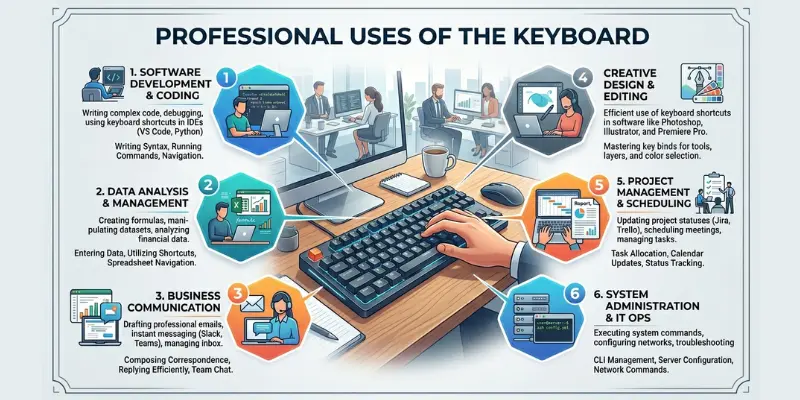
1. Typing and Writing
The most basic and important uses of keyboard is typing. Students use it every day to write essays, assignments, reports, and notes in programs like Microsoft Word and Google Docs.
2. Keyboard Shortcuts
Shortcuts let you perform actions in seconds without touching your mouse. For example, Ctrl + C copies text and Ctrl + V pastes it. These shortcuts save students hours of work every single week.
3. Data Entry
Keyboards are used to enter information into spreadsheets, databases, and online forms. Businesses rely on data entry every day, and it is one of the most in-demand computer skills in the job market right now.
4. Internet Browsing
You use your keyboard to type website addresses, search on Google, and fill out login forms. Browser shortcuts like Ctrl + T for a new tab and Ctrl + L for the address bar make browsing much faster.
5. Communication and Messaging
Every email, chat message, and social media post starts with a keyboard. Whether you are writing on Gmail, WhatsApp Web, or Discord, your keyboard is how your words reach other people online.
6. Gaming
Gamers use keyboards to control movement, aim, and actions in video games. The W, A, S, and D keys are used by millions of gamers worldwide to move characters in almost every PC game available.
7. Programming and Coding
Programmers write thousands of lines of code every day using nothing but a keyboard. Special keys such as brackets, semicolons, and the Tab key are used frequently in programming languages like Python, Java, and HTML.
8. Navigation Without a Mouse
Your keyboard can control your entire computer without a mouse. Arrow keys move your cursor, Tab moves between fields, and the Enter key confirms actions. This is especially useful when a mouse stops working.
9. Accessibility and Assistive Use
People with physical disabilities use keyboards as their main way to operate a computer. Special keyboards with large keys or on-screen keyboards help users who cannot comfortably use a standard keyboard.
10. Creative Work: Music, Design, and Editing
Keyboards are used in video editing software such as Premiere Pro and photo editing tools such as Photoshop. Shortcut keys massively speed up creative work. Music producers also use keyboard shortcuts in software like FL Studio to create beats faster.
Frequently Asked Questions About Uses of Keyboard
People ask a lot of questions about keyboards. Here are the most common ones with simple, clear answers. No complicated words. No confusing explanations. Just straight answers that actually help you understand your keyboard better.
The main uses of keyboard include typing, sending emails, browsing the internet, entering data, and using shortcuts. Students use keyboards every day to write assignments and communicate online. It is the fastest and most accurate way to give instructions to your computer without using a mouse.
You can use a computer without a keyboard, but it becomes very difficult. A mouse handles basic clicking, but you cannot type, write, search, or enter passwords easily. For any real work, such as writing, coding, or data entry, a keyboard is essential. On-screen keyboards exist, but they are much slower.
A standard full size keyboard has 104 keys. These include letter keys, number keys, function keys from F1 to F12, arrow keys, and special keys like Ctrl, Alt, and Shift. Some compact keyboards have fewer keys, around 60 to 80, designed to save desk space for students and travelers.
Every beginner should start with these five shortcuts. Ctrl + C to copy, Ctrl + V to paste, Ctrl + Z to undo, Ctrl + S to save, and Alt + Tab to switch between open windows. These five alone will save you a noticeable amount of time every single day.
A function key is a specific key on your keyboard labeled F1 to F12. Each one performs a set action like opening help or refreshing a page. A shortcut key is a combination of two or more keys pressed together. For example, Ctrl + P is a shortcut to print a document.
A membrane keyboard is best for most students because it is affordable, quiet, and easy to carry. If you type for long hours, a mechanical keyboard gives better comfort and feedback. Wireless keyboards are great for keeping your desk clean. A budget of 1500 to 3000 rupees covers a solid student keyboard.
Practice touch typing every day using free websites like Typing.com or Keybr.com. Start slow and focus on accuracy before speed. Keep your fingers on the home row keys: A, S, D, F for the left hand and J, K, L for the right. Most people double their speed within 30 days of daily practice.
In gaming, the keyboard controls character movement, actions, and in game commands. The W, A, S, D keys move the character in almost every PC game. Other keys handle jumping, shooting, and inventory. Gamers also program extra keys called macros to perform complex actions with a single key press during gameplay.
Keyboard skills help students work faster, write better assignments, and finish tasks in less time. Every career today involves computers. Typing quickly and accurately is a basic requirement in most jobs. Students who learn proper keyboard use early have a real advantage in school, exams, and their future workplace.
Programmers use the keyboard to write code, run commands, and navigate the terminal. Special keys like brackets, colons, semicolons, and the Tab key are used constantly. Coding shortcuts in editors like VS Code speed up the work significantly. Without a keyboard, writing and testing code would be almost impossible to do efficiently.
Conclusion
So, in this article, we covered uses of keyboard in detail. Your keyboard is not just for typing. It handles shortcuts, gaming, coding, communication, data entry, and so much more. Every key has a real purpose. Once you start using your keyboard the right way, everything on your computer gets faster and easier.
My honest recommendation: start with shortcuts.
Learn five this week. Ctrl + C, Ctrl + V, Ctrl + Z, Ctrl + S, and Alt + Tab. That’s it. Those five will change how you work every single day. Now I want to hear from you. Which uses of keyboard surprised you the most? Drop a comment below and let me know.